Most hacked websites aren't victims of sophisticated cyber attacks. They're victims of an unpatched WordPress plugin from 2019. Or a password that was "admin123." Or a backup that didn't exist when it was needed.
The good news: 95% of web security is boring, basic stuff that anyone can implement. Here's what actually matters, in order of priority.
The non-negotiables
These are the things that, if you skip them, nothing else matters. Get these right first.
HTTPS everywhere
If your site still loads on HTTP, stop reading and fix this immediately. HTTPS encrypts the connection between your server and your visitors' browsers. Without it, any data sent through your site (passwords, form submissions, payment info) travels in plain text that anyone on the same network can read.
SSL certificates are free through Let's Encrypt. There is zero excuse for any website to not use HTTPS. Browsers actively warn users about HTTP sites, Google penalizes them in search rankings, and visitors don't trust them. It's the bare minimum.
Strong, unique passwords
The most common attack vector isn't some genius hacker writing custom exploits. It's automated scripts trying millions of password combinations against your login page.
Minimum standards:
- 16+ characters (12 is outdated advice)
- Generated randomly, not "creative" variations of real words
- Unique for every account. Not reused anywhere
- Stored in a password manager (Bitwarden, 1Password, KeePass). Never in a browser, never in a text file, never in your head
If your admin password is your pet's name plus your birth year, change it right now. Brute force attacks crack 8-character passwords in minutes.
Two-factor authentication
Even a strong password can be compromised through phishing, data breaches, or malware. 2FA means that even if someone gets your password, they still can't log in without the second factor.
Use an authenticator app (Google Authenticator, Authy, or a password manager with TOTP support). SMS-based 2FA is better than nothing but vulnerable to SIM swapping attacks.
Enable 2FA on:
- Your website admin panel
- Your hosting account
- Your domain registrar
- Your email (because email is the master key to all your other accounts)
- Your analytics and business tools
This single step blocks the vast majority of unauthorized access attempts.
Keep everything updated
Software updates are annoying. Getting hacked is more annoying.
Why updates matter
Every piece of software has vulnerabilities. When researchers find them, they report them. The software maker releases a patch. Then they publish details about the vulnerability. At that point, every hacker in the world knows exactly how to exploit systems that haven't updated.
The window between "patch released" and "exploit in the wild" keeps shrinking. For critical WordPress vulnerabilities, it can be hours. Not days. Hours.
What to update and when
CMS core (WordPress, Joomla, etc.): Update within 24 hours of a security release. Enable auto-updates if you can.
Plugins and extensions: These are the number one attack vector for CMS-based sites. A single outdated plugin with a known vulnerability is an open door. Update weekly at minimum. Remove any plugins you're not actively using.
Server software (PHP, Node.js, web server): Update quarterly or whenever security patches drop. Your hosting provider should handle this on managed hosting.
Themes and templates: Yes, these get vulnerabilities too. Keep them updated or replace them with custom code that you control.
Backups: Your insurance policy
All security measures can fail. Backups are what save you when they do.
The 3-2-1 rule
Keep 3 copies of your data on 2 different types of storage with 1 copy offsite. This means:
- Your live site (copy 1, on the server)
- A local backup (copy 2, different storage type)
- A cloud backup (copy 3, offsite, different provider)
Backup frequency
Database: Daily. Your database contains your content, user data, orders, and everything that changes frequently.
Files: Weekly. Your site files change less often unless you're constantly adding media.
Full server snapshot: Monthly. For complete disaster recovery.
Test your backups
A backup you've never tested is a backup that might not work. Every quarter, restore a backup to a staging environment and verify that everything loads correctly. Finding out your backups are corrupted after you've been hacked is a particularly cruel discovery.
Hardening your site
Once the basics are covered, these measures add extra layers of protection.
Web application firewall
A WAF sits between the internet and your website, filtering out malicious traffic before it reaches your server. It blocks common attacks like SQL injection, cross-site scripting (XSS), and DDoS attempts.
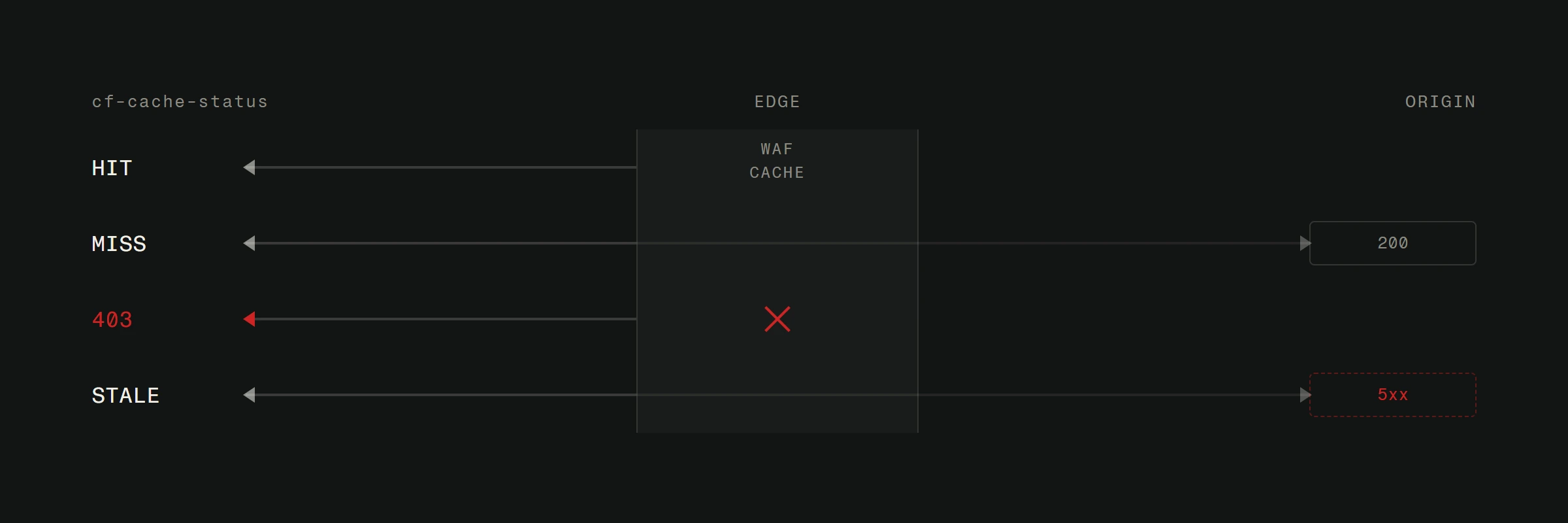
Cloudflare's free tier includes basic WAF protection and is worth setting up for any website. For more serious protection, Sucuri or Cloudflare Pro offer advanced rule sets.
Limit login attempts
By default, most login pages allow unlimited attempts. That's an invitation for brute force attacks. Limit logins to 5 attempts before a 15-minute lockout. After 15 failed attempts, block the IP entirely.
Also change the default login URL if your CMS allows it. Moving from /wp-admin to something custom eliminates a huge amount of automated attack traffic.
File permissions
Your server file permissions determine who can read, write, and execute files. Incorrect permissions are one of the most common ways attackers escalate access after an initial breach.
Standard permissions:
- Directories: 755 (owner can read/write/execute, others can read/execute)
- Files: 644 (owner can read/write, others can read)
- Configuration files with credentials: 600 (owner only)
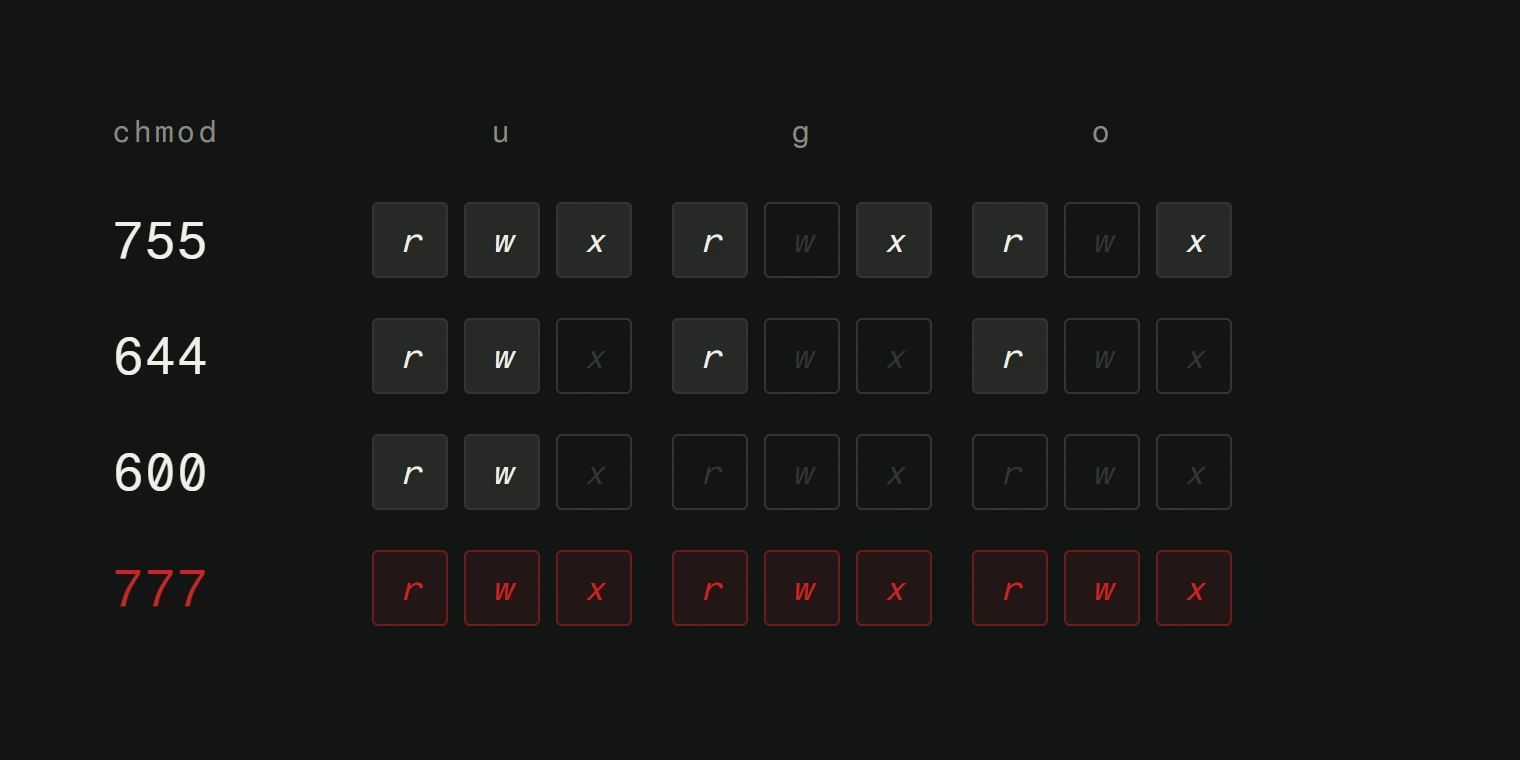
Never set anything to 777. Ever. That gives everyone full access to everything.
Content security policy headers
CSP headers tell browsers which sources of content are allowed on your page. They prevent XSS attacks by blocking inline scripts, unauthorized external scripts, and other injection vectors.
A basic CSP header looks like this:
Content-Security-Policy: default-src 'self'; script-src 'self' https://trusted-cdn.com; style-src 'self' 'unsafe-inline'
This tells the browser: only load resources from my domain and my trusted CDN. Everything else gets blocked.
Disable directory listing
If someone navigates to a folder on your server (like /wp-content/uploads/), they shouldn't see a list of all files. Directory listing exposes your file structure and makes it easier for attackers to find vulnerable files.
Add this to your .htaccess or server configuration:
Options -Indexes
Monitoring and response
Security isn't a one-time setup. It's an ongoing process.
Uptime monitoring. Use a service like UptimeRobot (free) or Better Stack to alert you immediately if your site goes down. Unexpected downtime can indicate a breach.
File integrity monitoring. Tools like Wordfence (WordPress) or OSSEC (general) alert you when core files are modified unexpectedly. If your index.php changes and you didn't change it, something is wrong.
Regular security scans. Run monthly scans with tools like Sucuri SiteCheck or Mozilla Observatory. They catch common misconfigurations and known vulnerabilities.
Have a response plan. Know what you'll do before you get hacked. Who to contact, how to take the site offline, where your backups are, how to restore. Figuring this out during an active incident is the worst time to figure it out.
The one thing most people skip
Everything above is technical. But the biggest vulnerability on most sites is human. Phishing emails that trick you into entering your password on a fake login page. Social engineering calls that convince hosting support to reset your password. A contractor who still has admin access six months after the project ended.
Audit your user accounts quarterly. Remove anyone who doesn't need access. Educate yourself and your team on phishing. And never, ever click a link in an email that asks you to "verify your account."
A fast, well-built website that gets hacked becomes worthless overnight. Security isn't glamorous work, but it protects everything else you've invested in your online presence.
Where does your site stand?
Run the free check: we read what your site shows publicly, with no passwords and no access. If you want someone to watch and patch it regularly, see the protection plans.
Want a security audit of your current site? Reach out and we'll check your setup for vulnerabilities before someone else does.