Building a WordPress site with Elementor usually starts the same way. You stare at a blank page. You drag in a section. You tweak padding. You adjust fonts. You spend two hours on a header that looks almost like every other header on the internet.
Skelementor exists to skip that part.
It's a free component library built specifically for Elementor. Headers, footers, hero sections, testimonial blocks, pricing tables. Ready-made pieces you can drop into your project and customize from there.
What Skelementor actually offers
Think of it as a starter kit for Elementor builds. Instead of designing every section from zero, you browse their library, find a component that fits your layout, and import it directly into your Elementor editor.
The library covers the sections you build most often:
- Headers and navigation bars. Multiple styles from minimal to full-featured.
- Hero sections. The first thing visitors see. Getting this right matters.
- Feature grids and service sections. Clean layouts for presenting what you or your client does.
- Testimonials and social proof. Pre-styled blocks ready for real content.
- Footers. Nobody wants to spend an hour building a footer. Now you don't have to.
Every component is designed to be customized. The point isn't to use them as-is. The point is to start further ahead so you spend your time on the parts that make the site unique.
Why this matters for WordPress developers
Time is the most expensive part of any web project. Not hosting. Not domains. Not plugins. Time.
If you're building WordPress sites for clients, you know that a huge chunk of project hours goes into assembling common sections. Skelementor cuts that down significantly. You import a component, adjust colors and fonts to match the brand, swap in real content, and move on.
For freelancers and small teams, this is a real advantage. Faster builds mean better margins. Or it means you can spend more time on the things that actually differentiate the project: strategy, content, user experience.
Setting it up right
Skelementor works with Elementor and Elementor Pro. The components are built using Elementor's flexbox container system, which is the standard layout method now. If you're on an older Elementor installation that still uses the legacy section/column system, you'll need to switch to flexbox containers first.
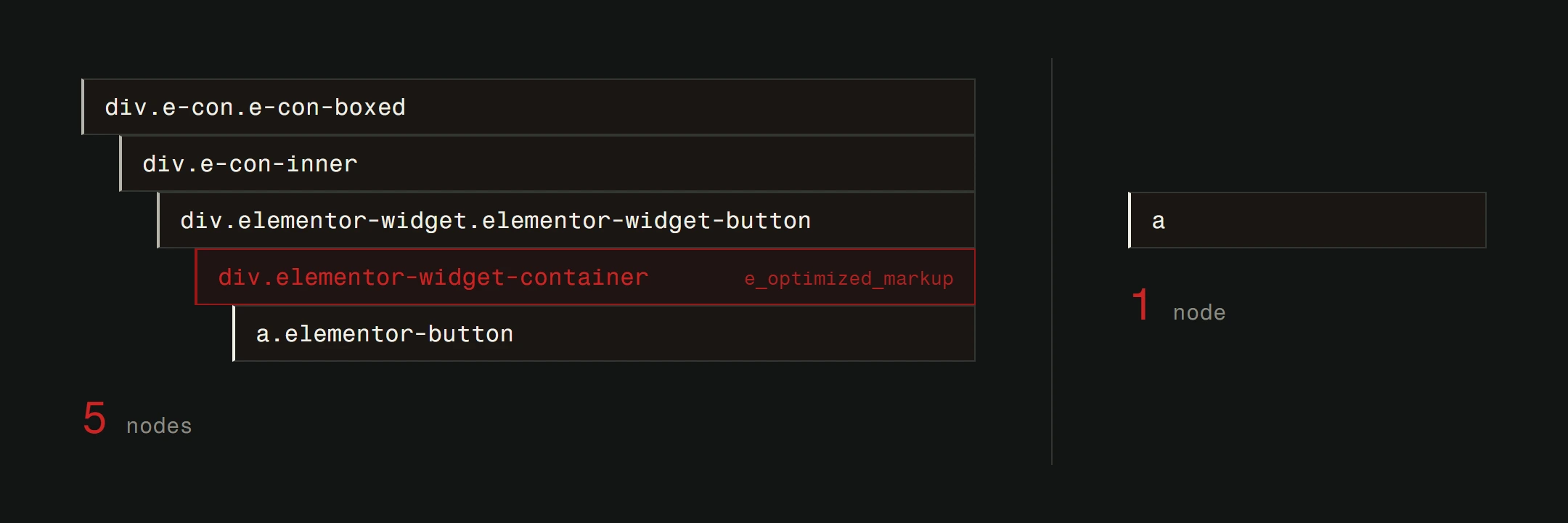
Flexbox containers give you better responsive control, cleaner markup, and more predictable behavior across devices. Any new Elementor installation uses them by default.
With flexbox containers active, Skelementor components import cleanly and respond to different screen sizes the way you'd expect.
The quality question
Free design resources have a reputation problem. Too many of them look generic, use inconsistent spacing, or fall apart on mobile. Skelementor is better than most.
The components follow consistent design patterns. Typography scales properly. Spacing is intentional. They won't win design awards, but they provide a genuinely useful starting point that doesn't embarrass you in front of clients.
That said, you still need to customize. A component library is a tool, not a finished product. The difference between a site that looks like a template and a site that looks custom-built comes down to how much thought you put into the details after import.
When to use Skelementor (and when not to)
Use it when you're building a standard business site, portfolio, or landing page on WordPress with Elementor. It will save you hours on the sections that every site needs.
Use it when you're prototyping. Need to show a client a rough concept fast? Import a few Skelementor components, add their content, and present something tangible in a fraction of the time.
Skip it when the project demands a completely original design. If you're building something that needs to look like nothing else on the web, starting from a component library works against that goal.
Skip it when you've outgrown WordPress page builders entirely. If your projects need more performance, more control, or more complex functionality, custom development is the better path. Page builders add overhead that you can't fully eliminate, and that overhead shows up directly in your Core Web Vitals, the loading and stability scores Google factors into ranking.
The bigger picture: Tools vs. craft
Skelementor is a productivity tool. A good one. But it's worth stepping back and asking a broader question: how much of your site should be assembled from pre-built pieces versus built from scratch?
For existing WordPress sites and budget-conscious projects, tools like Skelementor, Elementor, and the broader WordPress plugin ecosystem make a lot of sense. They keep costs down and delivery times short.
For projects where performance, uniqueness, and long-term scalability matter most, a custom-built site will always outperform one assembled from components. No page builder overhead. No plugin dependencies. Just clean code built for your specific needs.
WordPress is a solid starting point. When you're ready for more, custom-built is the way forward. Many of our clients start with WordPress and move to custom as their business grows. The important thing is choosing the right tool for where you are now.
If you're running a WordPress site and want to know whether it's performing as well as it should, our website analysis can give you a clear picture. And if you're worried about security, that's a separate conversation worth having.
Building a WordPress site? These components speed you up. And when you outgrow the page builder, we build custom.