There are two ways to build a website. Use a visual builder like Elementor that handles the code for you. Or write custom code that does exactly what you need and nothing else.
Both work. Neither is universally better. The right choice depends on your budget, your timeline, and how much you need your website to do.
Let's compare them directly.
Speed and performance
This is where the gap is most obvious.
Elementor generates markup behind the scenes. When you drag a button onto a page, Elementor wraps it in several layers of divs, adds inline styles, loads its own CSS framework, and includes JavaScript for features you might not even use. A single button might produce 20 lines of HTML where custom code needs 1.
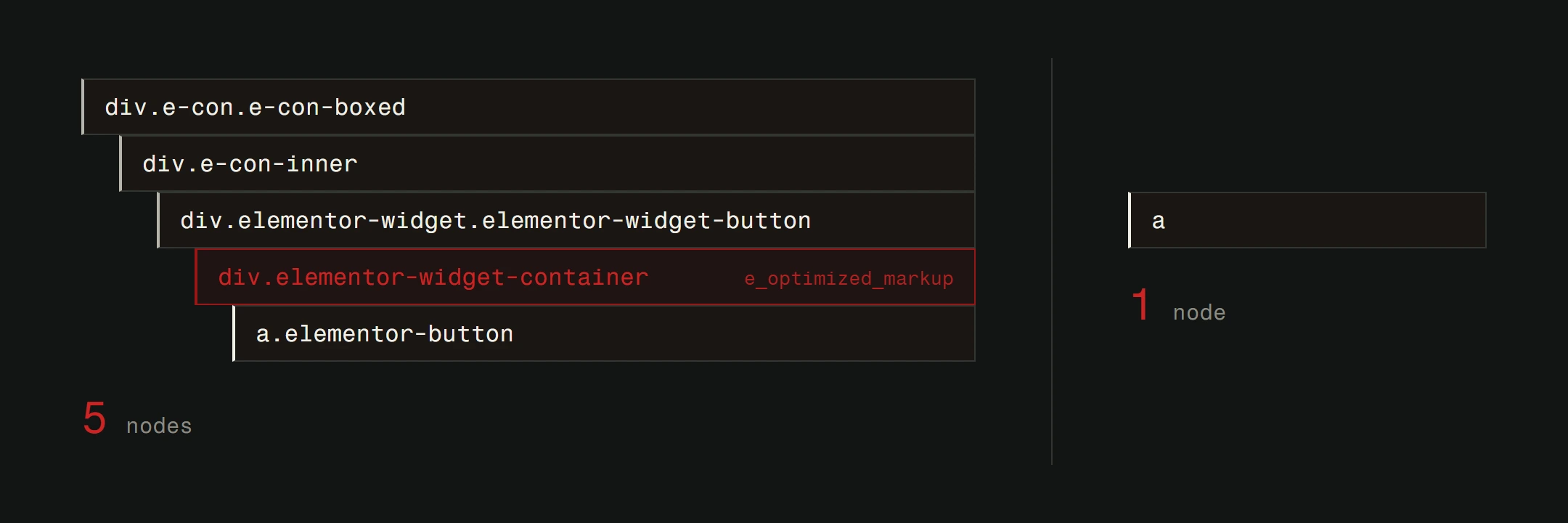
Multiply that across an entire page. Then across an entire site. The difference in file size is significant.
We've measured it. A typical Elementor homepage weighs 800KB to 1.5MB. The same design built with clean, custom code comes in at 150KB to 400KB. That's not a small difference. On mobile networks, it's the difference between a site that loads in 1.5 seconds and one that takes 4.
Google's Core Web Vitals measure this directly, the loading and stability scores Google factors into ranking. Faster sites rank higher. Every extra kilobyte works against you, so serving images in modern formats like WebP or AVIF helps too.
Winner: Custom code, by a wide margin.
Cost upfront
Elementor Pro costs $59/year for one site. Add a WordPress theme ($50-80), hosting ($3-10/month), and a few premium addon plugins ($30-100 each), and you're looking at roughly $200-400 for the first year.
Custom development starts higher. A professionally built custom website typically costs $2,000-10,000+ depending on complexity. That's a real investment.
For a startup testing an idea or a small business getting online for the first time, Elementor's lower entry point makes sense. You validate the business first, then invest in infrastructure.
Winner: Elementor, for initial budget.
Cost long-term
Here's where the math gets interesting.
Elementor's annual license renewals, premium addons, and the hosting upgrades you need because the site is heavy add up year over year.
More importantly, Elementor sites tend to need more maintenance. Plugin conflicts after updates. Layout breaks that need debugging. Performance optimization that fights against the builder's overhead. These hours cost money whether you do them yourself or pay someone.
Custom sites have lower ongoing costs. Fewer moving parts mean fewer things that break. Better performance means cheaper hosting. No plugin licenses to renew.
Over a 3-5 year period, the total cost of ownership often evens out or tips in favor of custom. Especially when you factor in the SEO value of better performance.
Winner: Custom code, over time.
Design flexibility
Elementor gives you a lot of options within its system. You can adjust spacing, colors, typography, and layout with precision. The widget library covers most common elements. For standard business websites, it's enough.
The ceiling hits when you need something outside Elementor's vocabulary. A custom scroll animation. An interactive pricing calculator. A unique layout that doesn't fit Elementor's container model. You either install another addon, write custom CSS/JS (defeating the purpose of a visual builder), or accept that you can't do it.
Custom code has no ceiling. If a browser can render it, you can build it. Every interaction, every animation, every layout is possible. You're limited only by skill and time, not by a tool's feature set.
Winner: Custom code, for unique designs. Elementor, for standard layouts.
Ease of content updates
This is Elementor's strongest argument. Click on text, type new text, see it change in real time. Non-technical team members can update content without touching code or calling a developer.
Custom sites handle this differently depending on how they're built. A well-built custom site with a CMS (like WordPress used as a headless CMS, or a purpose-built admin panel) gives content editors a clean interface for updates. It just takes more planning upfront.
A poorly built custom site might require a developer for every text change. That's a build quality issue, not an inherent limitation.
Winner: Elementor, for out-of-the-box editing. Custom code, if a CMS is properly set up.
SEO capabilities
Both Elementor and custom sites can implement SEO basics: meta titles, descriptions, structured headings, alt text. WordPress plugins like Yoast or RankMath work with both approaches.
The difference is in what you can't see. Clean HTML structure helps search engines understand your content. Minimal CSS and JavaScript mean faster crawling and indexing. Better performance scores lead to better rankings.
Elementor's generated code isn't bad SEO-wise. But it's heavier than it needs to be. Custom code lets you build exactly the HTML structure search engines want, with nothing extra.
For competitive keywords where small ranking differences matter, this adds up. For local businesses with less competition, it might not make a noticeable difference. For deeper understanding of how search optimization works, read our SEO fundamentals guide.
Winner: Custom code, for competitive SEO. Tie, for basic SEO needs.
Maintenance and updates
WordPress core, your theme, Elementor itself, Elementor Pro, addon plugins, other plugins. That's a lot of software that needs to stay updated and compatible.
Every update is a potential breaking point. Major Elementor version transitions have been rough for many sites. Theme updates can conflict with Elementor's styling. Plugin updates can break widget functionality.
Keeping a WordPress site secure and maintained requires regular attention regardless of whether you use Elementor. But the more plugins in the stack, the more surface area for problems.
Custom sites built on modern frameworks have fewer dependencies. Updates are more controlled. When something changes, it's because you changed it, not because a third-party plugin pushed an update that broke your layout.
Winner: Custom code, for stability. Elementor, for self-service updates.
Migration and lock-in
This might be the most underrated consideration.
Elementor stores your page content in its own format. If you ever decide to switch to a different builder, a different CMS, or custom code, you can't just export your content. You'll rebuild from scratch.
That's a real lock-in. It means the decision to use Elementor today affects your options for years. If the plugin is ever discontinued, significantly changes pricing, or stops supporting your WordPress version, you're stuck.
Custom code that follows web standards (HTML, CSS, JavaScript) doesn't lock you in. Content can be migrated. Designs can be adapted. You own everything.
Winner: Custom code, clearly.
The WordPress foundation
Both approaches can run on WordPress. That's worth noting. WordPress itself is a capable CMS with a proven track record. The question isn't whether to use WordPress. It's how to build on top of it.
Elementor is one way. Custom themes and blocks are another. Headless WordPress with a modern frontend is a third. The best approach depends on who's building it, who's maintaining it, and what the site needs to do.
Choosing the right foundation matters more than most people realize. If you're at that decision point, our guide on picking the right CMS covers the options.
Making your decision
Use Elementor if you need a website quickly, have a limited budget, and your needs are standard. It's a legitimate tool that serves millions of sites well.
Choose custom development if performance matters, if your design needs are unique, if you're thinking long-term, or if your website is a core part of how your business makes money.
And know that it's okay to start with one and move to the other. Many successful businesses launched on Elementor and later invested in custom development when the ROI justified it. The key is being intentional about the trade-offs. If you are still figuring out the basics, our guide on building a website with zero experience lays out all three paths (builders, WordPress, and hiring a professional) honestly.
Not sure which approach is right for your project? We build custom, and we'll tell you honestly when a page builder is all you need. Get a free website analysis for a recommendation based on your goals, budget, and timeline.