Most websites are built backwards. A designer creates beautiful layouts. A copywriter fills them with text. Then someone asks "what about SEO?" and keywords get sprinkled on top like an afterthought.
That's why most websites don't rank. Keywords should inform the design from day one. They should shape your site architecture, your page structure, your headlines, and your navigation. Not as decoration. As foundation.
Why keywords matter before the first pixel is designed
A keyword isn't just a ranking target. It's a window into what your potential customers are thinking and searching for.
When someone types "custom web design for restaurants" into Google, they're telling you exactly what they need, how they describe it, and when they need it (now). If your website doesn't use those same words, you're invisible to that person.
Keywords influence every design decision:
- How many pages your site needs. If you serve three distinct audiences searching for three different things, you need three distinct pages.
- Your navigation structure. Menu labels should match what people search for, not internal jargon nobody uses outside your office.
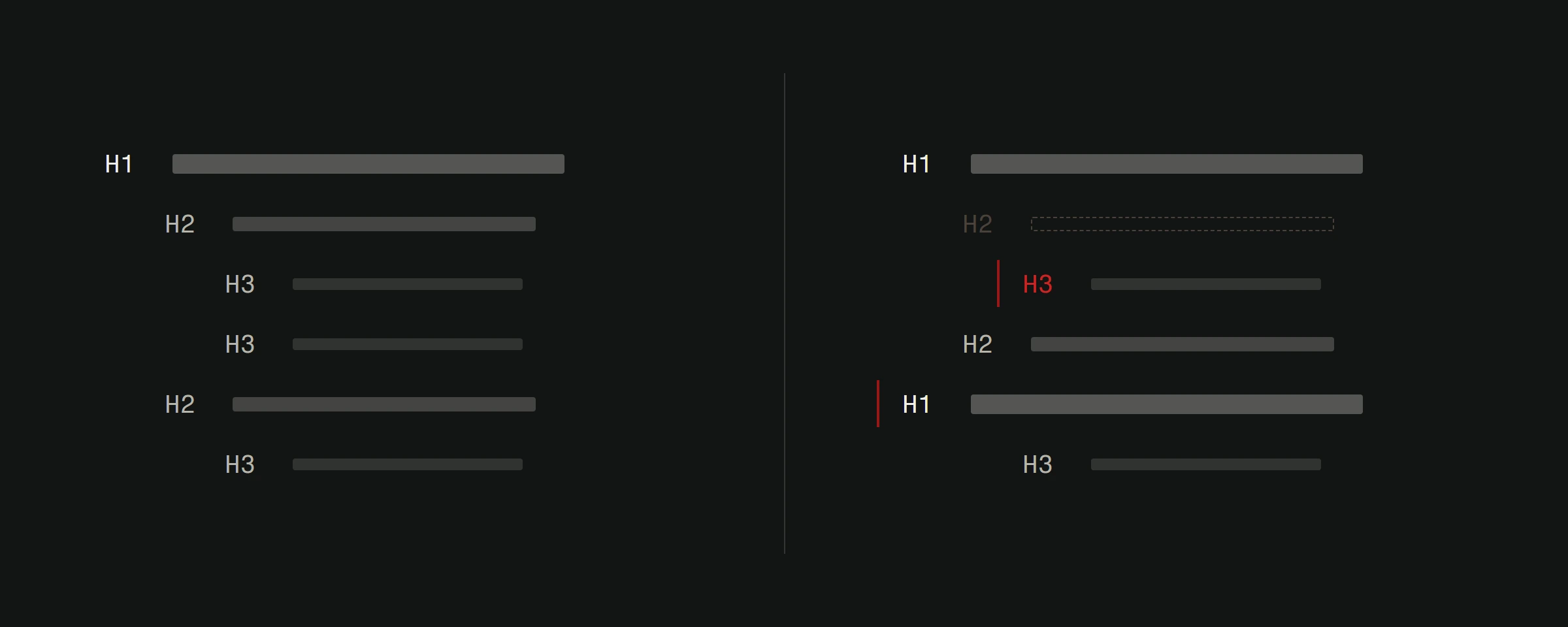
- Your content hierarchy. The most important keywords belong in H1 headings and above-the-fold content. Secondary keywords go in subheadings and supporting sections.
- Your URL structure.
/services/ecommerce-development/is a keyword-driven URL./services/service-3/is a missed opportunity.
If you want a primer on keyword fundamentals, start with our guide on what keywords are and how they work.
How to research keywords for a new (or redesigned) website
Keyword research before a web project isn't the same as keyword research for a blog post. You're building the entire information architecture, not targeting a single term.
Step 1: List your services and offerings
Write down everything you do. Be specific. Not "web design" but "custom website design," "e-commerce development," "website redesign," "landing page design." Each service is a potential keyword cluster and potentially its own page.
Step 2: Think like your customer
Your customers don't use your internal terminology. A restaurant owner doesn't search for "digital presence optimization." They search for "website for my restaurant" or "online ordering system."
Write down every way a customer might describe what they need from you. Ask your sales team what questions prospects ask. Check your email inbox for the exact phrases clients used when they first contacted you.
Step 3: Use research tools to validate and expand
Take your initial list to the tools:
Google Keyword Planner (free with a Google Ads account) shows search volume and competition. Great starting point.
SEMrush reveals what keywords your competitors rank for, keyword difficulty scores, and related keyword suggestions. Invaluable for competitive analysis.
Ahrefs Keywords Explorer shows click-through data alongside search volume. Some keywords have high search volume but low clicks because Google answers the question directly in a featured snippet.
Google's "People also ask" and autocomplete suggestions show you related queries real people are searching for. Type your seed keyword into Google and see what comes up.
Step 4: Cluster keywords by intent and topic
Group your keywords into clusters. Each cluster becomes a page or section on your site.
Example for a web development company:
- Cluster 1 (Service page): "custom web design," "professional website design," "web design company"
- Cluster 2 (Service page): "e-commerce website development," "online store design," "Shopify alternative custom"
- Cluster 3 (Blog): "how much does a website cost," "web design pricing," "website cost calculator"
- Cluster 4 (Local): "web design Zadar," "web company Croatia," "website designer near me"
Each cluster has a primary keyword (highest volume, most relevant) and supporting keywords that you weave naturally into the content.
Step 5: Assess difficulty vs. opportunity
Not every keyword is worth targeting. Check three things:
Search volume. Is anyone searching for this? A keyword with 10 searches per month might still be worth targeting if those 10 people are your exact ideal customer.
Keyword difficulty. Can you realistically rank for it? A brand new site won't rank for "web design" against established competitors. But "custom web design for healthcare clinics" might be wide open.
Business value. Does ranking for this keyword bring you customers or just traffic? "Free website templates" has huge volume but zero commercial intent for a company selling custom work.
Where to place keywords in your website design
Once you have your keyword map, implementation is where design and SEO meet.
Homepage
Your homepage should target your broadest, most important keyword cluster. For a web development company, that might be "web design company" plus your city name.
- H1 heading: Include your primary keyword naturally. "Custom Web Design That Converts" works. "Web Design Company Croatia" feels forced.
- Subheadings: Work in secondary keywords. "E-Commerce Development," "Website Redesign," "SEO Optimization" as section headings for your services overview.
- Body text: First 100 words should include your primary keyword. Write naturally.
Service pages
Each service page targets its own keyword cluster. This is where most of your SEO value lives.
- URL:
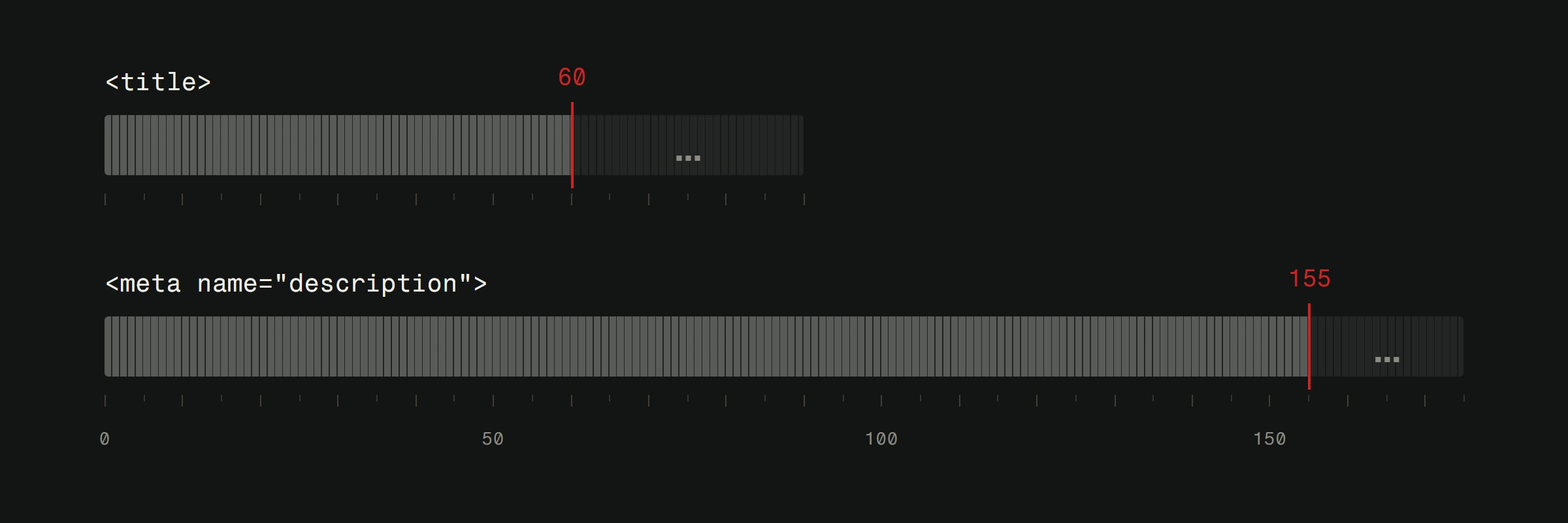
/services/ecommerce-development/with the keyword in the slug. - Title tag: "E-Commerce Website Development | Version2" under 60 characters.
- H1: Matches the title closely. "Custom E-Commerce Development for Growing Brands."
- Content: 500+ words minimum. Describe the service, who it's for, how it works, what makes your approach different. Include FAQs that target long-tail variations.
Blog posts
Blog posts target informational keywords your audience searches for. Each post builds topical authority that strengthens your service pages.
If you're a web development company, blog posts about "how to choose a web designer" or "website redesign checklist" bring in potential clients at the research stage. Our guide on writing SEO blog posts covers the details.
Technical placement
Beyond visible content, keywords belong in these technical elements:
- Meta descriptions. Every page gets a unique one, under 155 characters, with the primary keyword.
- Image alt text. Describe what's in the image. Include keywords where natural.
- Image filenames.
custom-ecommerce-design-homepage.webpnotscreenshot-2024.png. - Schema markup. Structured data helps Google understand your content type and can improve how your pages appear in search results.
Common keyword mistakes in web design projects
Building the site first, then doing SEO. The architecture should follow the keyword map. Bolting keywords onto an existing structure is always a compromise.
Targeting the same keyword on multiple pages. This is called keyword cannibalization. If three pages target "web design," Google doesn't know which to rank and often ranks none of them well. Each page needs its own primary keyword.
Ignoring long-tail keywords. Your homepage might target "web design company." But the blog post targeting "web design for veterinary clinics in Croatia" is what actually brings a new client through the door.
Forgetting about local keywords. If you serve a specific geographic area, local modifiers like your city, region, or country should appear naturally throughout your site. Local keywords often have lower competition and higher conversion rates. Our local SEO guide covers this in depth.
Stuffing keywords unnaturally. Google's natural language processing is good enough to understand context. "We are a web design web design company providing web design services for web design clients" reads terribly and helps nobody. Use variations. Write for humans.
Keywords aren't a one-time decision
Search behavior changes. New competitors enter your market. Trends shift what people look for. The keyword strategy you build at launch should be revisited quarterly.
Use Google Search Console to monitor which queries bring you traffic. Watch for new keywords appearing in your impressions data. These are opportunities to create new content or optimize existing pages.
Track your rankings for target keywords monthly. Tools like SEMrush make this easy with position tracking features. If a keyword drops, investigate. If a new keyword emerges, act on it.
Your website should be a living system that adapts to how your audience searches. The companies that treat keywords as a one-time checklist item lose ground to competitors who pay attention.
Redesigning an existing site? Our free website analysis is a good place to start: a developer goes through your site by hand and sends back what to fix first, ranked by impact, within 48 hours.