Where Google shows your site depends on many signals. Google itself lists the words of the query, the relevance and usability of pages, the expertise of sources, and the searcher's location and settings. Core Web Vitals belong to usability: they measure how fast a page loads, how quickly it responds to a tap and how still it stays while it loads.
It helps to know their weight up front. According to Google's documentation, Search always tries to show the most relevant content, even when the page experience is weaker. A good experience helps when many equally useful pages answer the same query. Speed doesn't replace good content, but in a crowded field it can decide, and no ranking brings back a visitor who left because the page was slow.
What are Core Web Vitals?
Core Web Vitals are three measurements Google uses to judge how real visitors experience your site: loading speed, responsiveness and visual stability.
Largest Contentful Paint (LCP) measures how long it takes for the biggest visible element on your page to appear. That's usually a hero image, a video thumbnail or a large block of text.
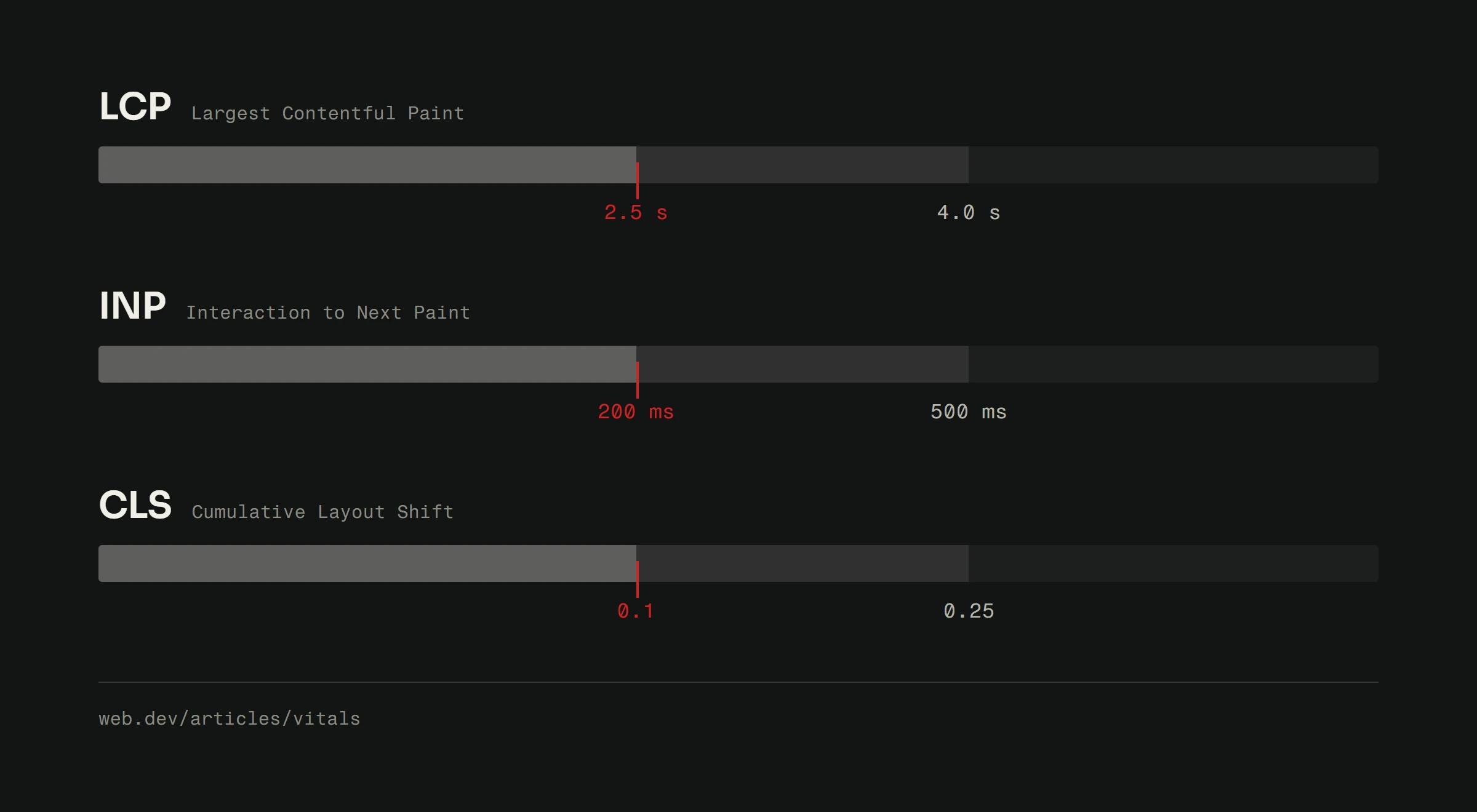
Good LCP: under 2.5 seconds. Anything over 4 seconds is considered poor.
Interaction to Next Paint (INP) replaced the older First Input Delay metric in March 2024. It measures how quickly your page responds when someone uses it: clicks, taps, key presses. INP looks at every interaction during the visit, not just the first one.
Good INP: under 200 milliseconds. If your buttons lag or a form is slow to open, your INP is probably poor.
Cumulative Layout Shift (CLS) measures how much your page jumps around while loading. You know the moment: you go to tap a button, the content shifts and you open something else. That's layout shift. Google measures it, and visitors find it irritating.
Good CLS: under 0.1. The lower the better.
Why these metrics affect your rankings
Google recommends that site owners achieve good Core Web Vitals and says that this, along with other aspects of page experience, aligns with what its core ranking systems seek to reward. It also advises against focusing on one or two metrics alone and asks you to look at the overall experience. Its self-assessment questions include these: is the page served securely, does it display well on mobile, do ads distract from the main content, does it use intrusive interstitials, and can a visitor easily tell the main content from everything else.
For your business that means two things. Speed and stability won't lift thin content above useful content. But when several pages answer a query equally well, experience can be the difference, and a visitor who waits on a slow page or misses a button because the layout moved is quicker to give up.
How to check your scores
Before you fix anything, you need to know where you stand.
Google PageSpeed Insights is the go-to tool. Enter your page address and you'll get scores for all three metrics, plus suggestions for improvement. It shows lab data (a simulated test) and field data (measurements from real Chrome visitors over the last 28 days), if your page has enough of them.
Google Search Console has a Core Web Vitals report that shows which pages pass or fail, grouped by issue type. It's useful for finding problems that repeat across your whole site.
Chrome DevTools lets you dig deeper if you're technical. The Performance tab shows exactly what happens during page load, frame by frame.
Start with PageSpeed Insights. It gives you the clearest picture with the least effort.
Fixing slow loading (LCP)
A slow LCP almost always means something big is taking too long to load. Here's where to look first.
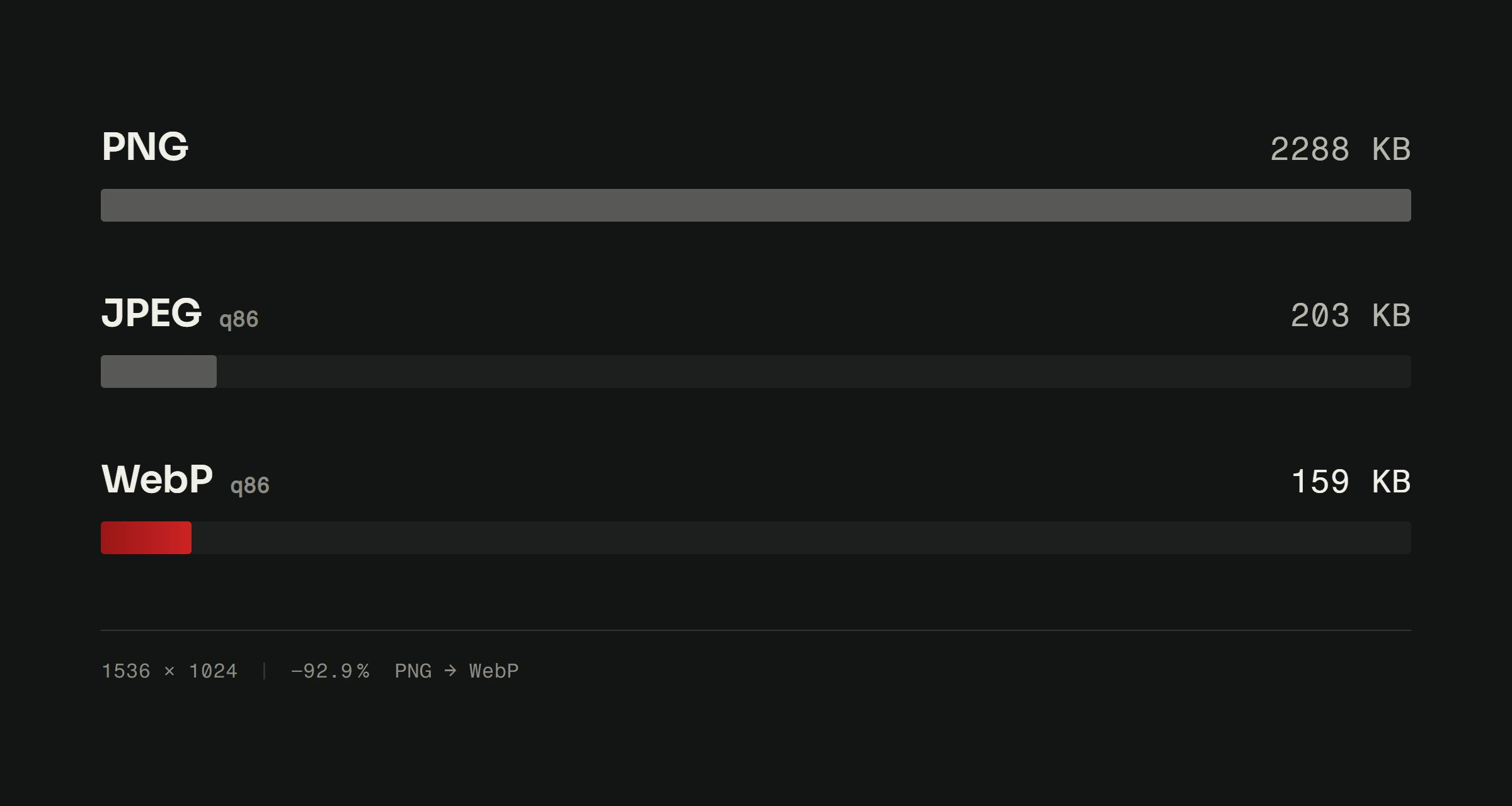
Optimize your images. This is the most common culprit. Use modern formats like WebP or AVIF instead of PNG or JPEG, and compress everything. A hero image doesn't need to be 4 MB.
Use lazy loading. Images below the fold don't need to load immediately; let them load as the visitor scrolls. Don't lazy-load your hero image, though. That's the one you want first.
Cut server response time. If your server takes two seconds just to start sending data, your LCP can't be good. Faster hosting can help here, and we've compared the options in our hosting comparison guide.
Remove render-blocking resources. If your page has to download and process 15 CSS files and 20 JavaScript files before it can show anything, it will be slow. Inline critical CSS, defer scripts the first view doesn't need, and remove what you don't use.
For more on speed, see our guide on website speed optimization.
Fixing slow interactions (INP)
A poor INP means your page is doing too much work when someone tries to use it. The browser is busy and can't respond quickly.
Reduce JavaScript execution time. Heavy scripts occupy the browser's main thread. When a page loads 2 MB of JavaScript, clicks easily start to feel slow, especially on weaker phones. Review your scripts and remove what isn't essential.
Break up long tasks. While a single JavaScript task runs longer than 50 milliseconds, the browser can't respond to input. Split heavy operations into smaller pieces.
Reduce third-party scripts. Analytics, chat widgets, social embeds, tracking pixels. Each one adds weight, so keep only the ones you actually use.
Move heavy computation to web workers. If your page has to process data, take it off the main thread so the interface stays quick to respond.
Fixing layout shifts (CLS)
Layout shift is usually the easiest to fix because the causes are predictable.
Always set dimensions on images and videos. If the browser doesn't know how big an image will be, it renders the page without it, then shifts everything below when the image arrives. Specify width and height attributes in your HTML.
Reserve space for ads and embeds. An ad that loads after the rest of the page pushes everything down. Give it a fixed-size container.
Don't insert content above existing content. Banners that slide in from the top and cookie notices that push the page down ruin your CLS score.
Watch how web fonts load. A font that arrives late can change the width of text and move lines around. Preload the fonts visible on the first screen and choose a system fallback with similar proportions.
Beyond Core Web Vitals: What else affects rankings
Core Web Vitals matter, but they're not everything. Alongside page experience, these signals count most:
Content quality. Your content has to answer the query usefully and accurately. No amount of speed work fixes thin content. Start with the SEO fundamentals.
Backlinks. Other websites linking to yours show that they trust it. Quality matters more than quantity.
Mobile display. Google indexes the mobile version of your site. If it can't be used normally on a phone, you have a problem.
HTTPS. Google lists secure serving among its page experience questions, and browsers mark sites without HTTPS as not secure. It's also a basic security requirement.
Structured data. Schema markup helps Google understand your content and can make a page eligible for rich results in search.
What changed at Google in 2025 and 2026
According to the Google Search Status Dashboard, since the start of 2025 Google has started core ranking updates on 13 March 2025, 30 June 2025, 11 December 2025, 27 March 2026 and 21 May 2026. Spam updates started on 26 August 2025, 24 March 2026, 24 June 2026, 18 August 2026 and 24 September 2026. If your positions in Search Console change suddenly, compare the date with this list first. A move after a core update doesn't necessarily mean something on your site is broken.
The second change is AI Mode, the Google Search mode in which AI writes the answer and links to its sources. Google's help pages list it in many countries and languages, Croatian included. Google asks for nothing special: a page must be indexed and eligible to show a snippet in ordinary search, and the same fundamentals apply as before, crawling allowed, internal links, a good page experience and text that actually answers the question. Search Console counts visits from those answers in the Performance report, under the Web search type.
The real competitive advantage
Core Web Vitals have one rare quality among ranking signals: they're measurable. You see an exact number, you know which page is dragging it down, and after a fix you can watch in Search Console whether real visitors confirm it. Field data is collected over 28 days, so a fix shows up there only after a few weeks.
The most common causes of poor scores are heavy themes, lots of plugins and third-party scripts, because each one adds work for the browser. So on any site, first check what actually loads, and only then look for faster hosting or a new design.
Your Google ranking isn't just about keywords and backlinks anymore. It's also about how your website performs for real visitors. If you want to know where your site stands and what to fix first, our free website analysis will show you exactly that.