
Hosting is the foundation your website sits on. Pick a bad one and everything suffers. Slow loading, frequent downtime, poor support when things break at midnight. Pick a good one and you barely think about it. Which is exactly the point. Hosting speed also feeds straight into your Core Web Vitals, the loading scores Google factors into ranking, so it is not only an operations decision.
We've built WordPress sites for clients over the years, and we've dealt with nearly every major hosting provider along the way. Some impressed us. Some wasted our time. Here's what we actually recommend based on real project experience, not affiliate rankings.
Hostinger: Our default choice for most projects
For roughly 90% of our WordPress projects, we use Hostinger. The reason is simple: the price-to-performance ratio is hard to beat.
At 2-5 euros per month, you get hosting that actually performs. Their Amsterdam servers deliver solid speeds for European users. WordPress auto-updates, free SSL, one-click WordPress installation. It just works.
What we like:
- 99.9% uptime in our experience across dozens of sites
- Free domain for the first year
- 24/7 chat support (responsive and knowledgeable)
- The control panel is clean and beginner-friendly
What could be better:
- Backup options on the cheapest plan are basic (daily backups come with higher tiers)
- Renewal prices jump up after the initial term
For small businesses, blogs, portfolios, and standard business sites, Hostinger delivers more than you'd expect at this price point. Read more about our experience with Hostinger here.
SiteGround: Premium quality at premium prices
If budget is flexible and you want the best support in the industry, SiteGround is worth the higher price.
Their customer support is genuinely excellent. Fast responses from people who actually understand WordPress. Their SuperCacher technology makes a noticeable difference in load times. Daily automatic backups give peace of mind.
For e-commerce sites where downtime costs money, SiteGround is a strong pick.
What we like:
- Best customer support we've tested
- Advanced caching built in
- Strong security measures (automatic patching, WAF, anti-bot)
- Free SSL and CDN
What could be better:
- Noticeably more expensive than Hostinger
- Storage limits on basic plans are tight
- No Windows server option
SiteGround starts around $18/month on renewal pricing (the StartUp plan renews at $17.99/month). If support quality and managed features matter more than saving a few euros, this is the one.
WP Engine: Managed hosting for high-stakes sites
WP Engine is managed WordPress hosting. That means they handle the technical details: updates, security, backups, performance optimization. You focus on content and business.
Starting at around $25/month, it's the most expensive option here. But for high-traffic sites, business-critical applications, or clients who don't want to think about server management, the cost makes sense.
Auto-scaling handles traffic spikes. Staging environments let you test changes before they go live. The built-in CDN speeds up delivery globally.
What we like:
- Fully managed (hands-off server administration)
- Automatic scaling for traffic spikes
- Staging environments for safe testing
- Strong security defaults
What could be better:
- Highest prices in the comparison
- No email hosting included (you'll need a separate service)
- Visit limits per plan (overage charges apply)
WP Engine is overkill for a 5-page brochure site. For a busy online store or a company where the website generates significant revenue, it's a serious option.
Bluehost: WordPress.org recommends it. We're lukewarm.
Bluehost carries an official WordPress.org recommendation. That carries weight. And for simple, low-traffic sites, it works adequately.
Our experience has been mixed. Performance is inconsistent under load. The dashboard pushes upsells aggressively. Support is helpful but can be slow during peak hours.
What we like:
- Official WordPress recommendation
- Good documentation and knowledge base
- Free domain for the first year
What could be better:
- Performance drops under higher traffic
- Aggressive upselling in the admin interface
- Renewal prices are significantly higher than introductory rates
Bluehost is fine for a personal blog or a simple site that won't see heavy traffic. For business sites, we prefer Hostinger at a similar price point or SiteGround for better reliability.
Cloudflare Pages: For developers who want speed
This isn't traditional hosting. Cloudflare Pages serves static sites through a global CDN. If you're running a headless WordPress setup (WordPress as the CMS, with a static frontend), the performance is exceptional.
The free tier covers most smaller projects. Load times are consistently fast because content is served from the edge location nearest to each visitor.
This is a developer-oriented option. If you're not comfortable with build pipelines and static site generators, this isn't for you. But if you are, it's hard to beat on performance.
What to look for when choosing hosting
Forget the marketing pages. Here's what actually matters.
Loading speed. Your hosting provider sets the floor for how fast your site can be. No amount of speed optimization fixes a slow server. Check real performance data, not the provider's claims.
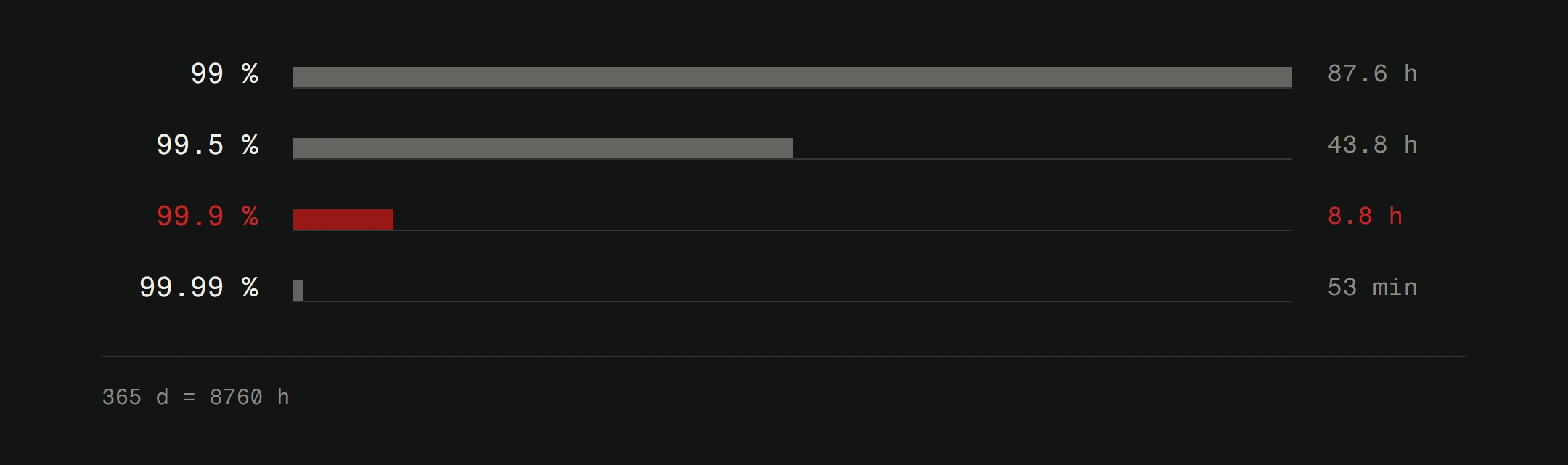
Uptime. Anything below 99.5% is unacceptable for a business site. That sounds high, but 99% uptime means nearly 4 days of downtime per year. Your hosting should be invisible, not a liability.
Support quality. Things break. Servers go down. Configurations get weird. When that happens at 2 AM, you need support that responds quickly and knows what they're doing. Test support before committing. Ask a technical question and see how they handle it.
Backup and recovery. Ask specifically: how often are backups made, how long are they retained, and how easy is it to restore? Automatic daily backups with one-click restore should be the minimum. Your website security depends on this.
SSL certificates. Non-negotiable. Every hosting plan should include free SSL. It's required for security and SEO. If a host charges extra for basic SSL, walk away.
Server location. For a Croatian audience, European servers (Amsterdam, Frankfurt) are ideal. If your host only has US-based servers, your European visitors will feel the latency.
Our recommendations by use case
Starting out or tight budget: Hostinger. Best value for money.
Business sites that need reliable support: SiteGround. You're paying for quality.
E-commerce or high-traffic sites: WP Engine or SiteGround. Performance and uptime are non-negotiable for revenue-generating sites.
Developer-led projects: Cloudflare Pages or a VPS. Maximum control and performance.
Common hosting mistakes
Choosing on price alone. Cheap hosting that crashes weekly costs more in lost business than mid-range hosting that just works.
Ignoring backups. Many businesses discover their backup situation the day they need to restore. By then it's too late. Check yours today.
Migrating for no reason. If your current hosting works well, switching providers is a risk that might not pay off. Migration can introduce temporary issues.
Skipping staging. Making changes directly on a live site is gambling. Good hosting includes staging environments. Use them.
If you're migrating hosts
Before you touch anything, make a full backup. Database, files, emails. Everything.
Set up the new hosting and test with a temporary domain or subdomain first. Check every page, every form, every integration. Only point your main domain to the new server when everything checks out.
For complex sites, do a staged migration. Move the staging version first, test thoroughly, then switch the production domain. This reduces the window where things can go wrong.
The bottom line
After years of working with different providers, Hostinger remains our default recommendation. The performance, price, and reliability hit the sweet spot for most projects.
For clients with higher demands, we move to SiteGround or WP Engine depending on the project's specific needs.
The best hosting for your site depends on your traffic, budget, and technical requirements. There's no single right answer. But there are definitely wrong ones, and they usually involve choosing the cheapest option without checking what you're actually getting.
When WordPress isn't enough
WordPress is a solid starting point for most businesses. Combined with good hosting, it handles blogs, portfolios, and standard business sites well. But there comes a point where plugins, themes, and hosting optimizations can only take you so far.
When you need performance that's genuinely fast (not "fast for WordPress"), full control over every interaction, and zero dependency on third-party plugins, custom development is the path forward. We build both. The right choice depends on where you are and where you're heading.
Good hosting is the first step. A well-built website on top of it is the second. If you want help with either, our web design service covers the full stack, from hosting setup to launch. Or start with a free website analysis to see where you stand today.