The pitch is always the same. "Build a stunning website in minutes. No coding required." And honestly? For some projects, that's true enough. For others, it's a trap.
Let's sort out which is which.
The no-code landscape right now
No-code tools have gotten genuinely good. Webflow gives you real CSS control through a visual interface. Framer has evolved into a full website builder with AI-powered layout generation and a built-in CMS, reaching a $2B valuation in 2025. Squarespace makes clean portfolio sites almost effortless. Wix now offers AI-driven site generation through its Harmony builder.
These aren't toys anymore. Real businesses use them. Real money gets made through them.
But there's a ceiling. And if you don't know where that ceiling is before you start building, you'll hit it at the worst possible time.
What no-code handles well
Simple business websites. Five to ten pages, contact form, maybe a blog. If your site is essentially a digital business card with some extra pages, no-code tools handle this fine.
Portfolio sites. Designers, photographers, artists. Template-driven layouts work here because the content (your work) does the heavy lifting. The site just needs to frame it properly and stay out of the way.
Landing pages. Single-page sites focused on one conversion goal. Sign up for the newsletter. Book a consultation. Download the guide. No-code builders are actually great for these because you can test different versions quickly without developer involvement.
Prototypes and MVPs. Testing a business idea before investing in proper development. Smart move. Build it cheap, validate the concept, then build it right. Either way, having your website preparation checklist sorted before you start saves weeks of back-and-forth.
Where no-code falls apart
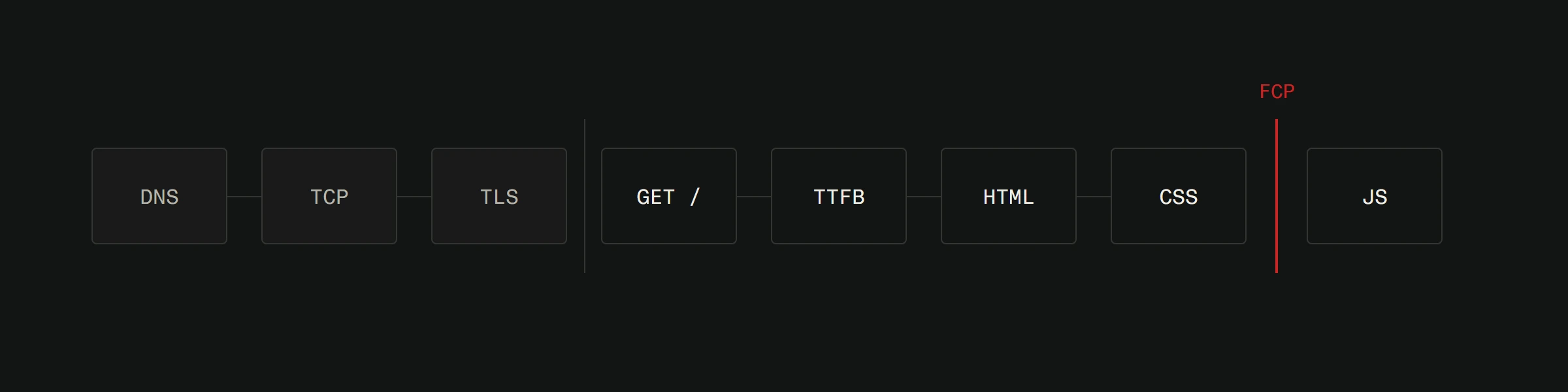
Performance. Every no-code builder adds overhead. Extra JavaScript, framework bloat, tracking scripts. A simple page built in Webflow can easily ship 2-3MB of JavaScript. The same page built with clean HTML and CSS might be 200KB. That difference matters for page speed and user experience.
Custom functionality. Need a booking system that connects to your calendar, sends confirmation emails, and processes payments in euros? Need a product configurator that calculates custom pricing? Need multi-language support with proper URL structures? You'll start fighting the platform instead of building features.
SEO control. No-code tools give you the basics. Title tags, meta descriptions, alt text. But fine-grained control over page structure, schema markup, canonical URLs, and crawl behavior? That's where the limitations show up. And for businesses competing in local search, those details matter.
Scalability. A site with 20 pages works fine in any builder. A site with 200 pages, complex filtering, and data-driven content? You'll feel the pain. Performance degrades. Management becomes tedious. Updates take forever.
True ownership. This is the big one people overlook. Your no-code site exists on someone else's platform. If Wix changes their pricing, you pay it or start over. If Squarespace removes a feature, you deal with it. Webflow does let you export static HTML on Workspace plans, but CMS content, e-commerce data, and dynamic functionality don't come with it. You get the shell, not the engine.
The "I'll just add code later" myth
Here's something no-code platforms won't tell you upfront. When you outgrow the platform, migration is painful. You don't get to keep your design. You don't get to keep your structure. You essentially start over.
We've seen this repeatedly. A business launches on Wix, grows for two years, then needs real e-commerce functionality or custom integrations. The migration costs more than building it properly would have from the start.
This doesn't mean you should never start with no-code. It means you should start with no-code knowing it might be temporary.
Good design principles apply everywhere
Regardless of whether you code or not, the same rules determine if your site works.
Visual hierarchy matters. The most important information needs to be the most visible. This sounds obvious. Look at most small business websites and you'll see it violated on every page. A wall of text with no clear priority is a wall people bounce off of.
White space is not wasted space. Beginners cram every pixel full of content. Experienced designers know that breathing room makes content more readable and more persuasive.
Consistency builds trust. Same fonts, same colors, same spacing patterns throughout. When things feel random, visitors feel uneasy. They might not know why. They just leave. Good user experience is mostly about consistency and clarity.
Mobile comes first. Design for the smallest screen first. Then expand for larger screens. Not the other way around. Most no-code builders let you preview mobile layouts. Use that preview. Then test on an actual phone. The preview lies sometimes.
When you should skip no-code entirely
Some projects should start with custom development from day one.
If the website is your primary business tool and revenue depends on it, you need full control over performance, design, and functionality. A real estate company competing for online leads in Split can't afford a generic template that loads in 5 seconds. An e-commerce store selling handmade products needs a shopping experience tailored to their workflow, not whatever Shopify decided was good enough for everyone. Even for a straightforward service business, going custom means a clean, fast site with SEO baked in from day one, something no template can deliver as effectively.
If you need integrations beyond basic email and analytics, custom code gives you clean connections to CRMs, payment processors, inventory systems, and whatever else your business runs on.
If brand differentiation matters, templates make you look like everyone else. Custom design makes you look like you.
The honest answer
No-code tools are genuinely useful for the right projects. They lower the barrier, they save money in the short term, and they let non-technical people get something live quickly.
But they're a trade-off. You trade customization for convenience. You trade performance for speed-of-launch. You trade ownership for simplicity. Those trades make sense sometimes. They don't always.
The key is knowing which trade you're making before you start building.
Want to know if your project fits the no-code path or needs something custom? We'll give you an honest answer. Start with a free website analysis or see what custom development looks like.