Elementor has over 10 million active installations. It's the most popular WordPress page builder by a wide margin. There's a reason for that. It makes building websites accessible to people who don't write code.
But popular doesn't always mean right for your project. Let's break down what Elementor actually does well, where it struggles, and who should (and shouldn't) use it.
What Elementor gets right
The visual editor is genuinely good. You drag elements onto a page, adjust them visually, and see results in real-time. No saving and refreshing. No guessing how something will look. For someone without coding experience, this is a big deal.
The template library saves time. Hundreds of pre-built page layouts organized by industry and purpose. You pick one, swap in your content, adjust colors and fonts, and you have a page. For a small business that needs a site quickly, this workflow works.
Responsive controls exist. You can adjust how elements look on desktop, tablet, and mobile independently. It's not automatic. You still have to check each breakpoint and tweak things. But the controls are there.
The free version is usable. Unlike some competitors that gate every useful feature behind a paywall, Elementor's free tier lets you build real pages. The pro version adds theme building, WooCommerce widgets, and more templates. But you can do meaningful work without paying.
Third-party ecosystem is huge. Dozens of addon plugins extend Elementor with extra widgets, templates, and functionality. If Elementor doesn't have a specific widget you need, someone's probably built one.
Where Elementor falls short
Here's where things get complicated.
Performance overhead is real. Elementor generates a lot of extra HTML, CSS, and JavaScript. A simple page that would be 50KB as hand-coded HTML might be 500KB with Elementor. That bloat drags down your Core Web Vitals, the loading and stability scores Google factors into rankings, which affects both user experience and SEO. You can claw some of it back with caching, careful asset loading, and serving images in modern formats like WebP or AVIF, but you are optimizing around the builder rather than starting lean.
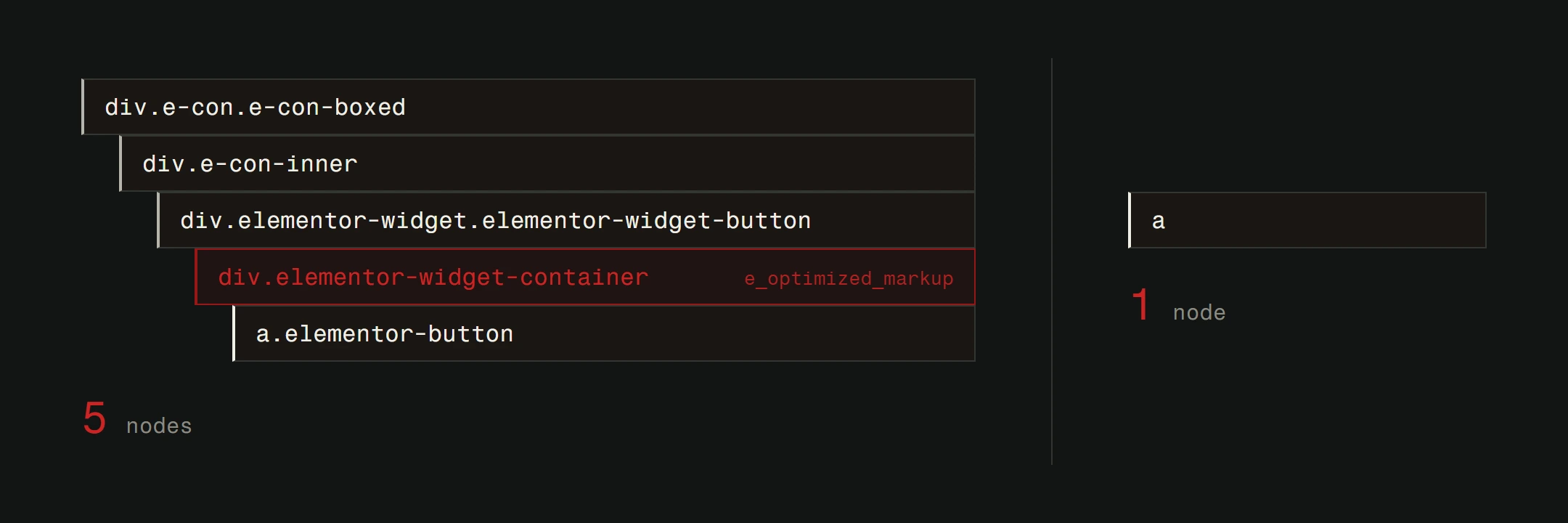
We've tested identical designs built with Elementor and built with clean code. The custom version loads 2-3x faster. On mobile connections, that difference is felt by every visitor.
You're building on a dependency. Your entire site structure depends on Elementor's plugin. If Elementor breaks after an update, your site breaks. If you ever want to switch away, you're looking at a complete rebuild. The content stored in Elementor shortcodes doesn't transfer cleanly to anything else.
The "no code needed" claim has limits. For basic pages, sure. But the moment you need something Elementor doesn't offer natively, you're writing custom CSS, installing addon plugins, or finding workarounds. The more custom your design needs are, the more you fight the tool instead of working with it.
Plugin conflicts are common. Elementor is a big, complex plugin. It interacts with your theme, other plugins, and WordPress core. Conflicts happen. We've seen sites where an Elementor update broke the layout entirely because of a theme incompatibility. This is a general WordPress security and maintenance concern that intensifies with page builders.
Updates can break things. Elementor pushes frequent updates. Most are fine. Some change how existing widgets work or render. If you don't test updates on a staging site first, you might wake up to a broken homepage.
The pricing reality
Elementor Pro starts at a modest annual fee for a single site. That's reasonable on its own. But the real cost isn't the license fee.
It's the time spent working around limitations. It's the premium addons you buy because the base feature set isn't enough. It's the hosting upgrade you need because the site is heavier than it should be. It's the redesign cost when you outgrow the platform.
The free version works for simple sites. But if you need form builders, WooCommerce integration, popup builders, or theme customization, you'll need Pro. And once you need Pro, you're committed to annual renewals.
Who should use Elementor
Elementor makes sense in specific situations.
Small businesses on a tight budget who need a site up quickly and can't invest in custom development yet. Elementor gets you online. That's valuable.
Non-technical site owners who want to make their own content changes without calling a developer every time. The visual editor handles text and image swaps well.
Prototyping and MVPs. If you need to test a business idea fast, Elementor lets you build a functional site in days. Validate the idea first, invest in proper development later.
Existing WordPress sites that already use Elementor and work fine. If it's not broken, don't rip it out. Just be aware of the limitations for future planning.
WordPress itself is a solid CMS. There's a reason it powers a huge portion of the web. Elementor is one way to work within that ecosystem.
Who should think twice
Elementor is not the best fit if:
Performance is critical. E-commerce sites where page speed directly impacts revenue. Sites targeting competitive SEO keywords where every ranking signal matters.
You need unique, complex interactions. Animations, custom layouts, application-like functionality. You'll spend more time fighting Elementor's constraints than building.
You're scaling. A 5-page brochure site? Elementor is fine. A 50-page site with frequently updated content, multiple user roles, and integrations? You're going to hit walls.
Long-term maintenance matters. If you plan to maintain and evolve this site for years, building on custom code gives you more control and fewer surprises during updates.
When custom development makes sense
Elementor is a starting point. For many businesses, it's the right starting point. But there comes a moment when the tool's limitations cost more than the savings it provides.
Custom-built websites load faster, score better on Core Web Vitals, have fewer maintenance headaches, and can do exactly what your business needs. Nothing more, nothing less.
The upgrade path usually looks like this: start with WordPress and a page builder when budget is tight. Learn what your business actually needs from its website. Then invest in a custom build that's designed specifically for those needs.
There's no shame in starting with Elementor. The mistake is staying with it when you've outgrown it.
The honest verdict
Elementor is a good tool for what it is: a visual page builder that makes WordPress accessible to non-developers. It has real strengths, a strong community, and a place in the ecosystem.
It's not the right choice for every project. The performance cost, the dependency risk, and the ceiling on customization are real trade-offs. Know what you're getting into.
If you're starting out and budget is limited, Elementor can get you a functional website. If your business depends on your website performing at its best, custom development is worth the investment.
Trying to figure out the right approach for your website? Get a free website analysis and we'll tell you straight, including when staying on WordPress is the right call.