You want a website. You have no technical background. Every article you find tells you it's "easy" and you can do it in an afternoon.
Let's be honest about that.
The real starting point
Building a website without experience is possible. But "possible" and "smart" are different conversations. Before you pick a tool or hire someone, you need to answer one question: what is this website actually supposed to do?
A portfolio showing your photography work? A landing page for your small business? An online store selling 500 products? A booking system for your apartment rentals?
Each of these needs a completely different approach. The person telling you "just use Wix" for everything is selling you a hammer when you might need a scalpel.
Option 1: Website builders (Wix, Squarespace, Webflow)
Website builders are the most accessible path. Drag elements around. Pick a template. Publish. You can have something live within a few hours.
What's good: Low barrier to entry. No coding required. Monthly pricing starts low. Templates handle the design decisions you're not ready to make.
What nobody tells you: You're renting, not owning. Your site lives on their platform. If they raise prices, you pay or lose everything. If they shut down a feature you rely on, tough luck. Want to move your site somewhere else later? Good luck with that.
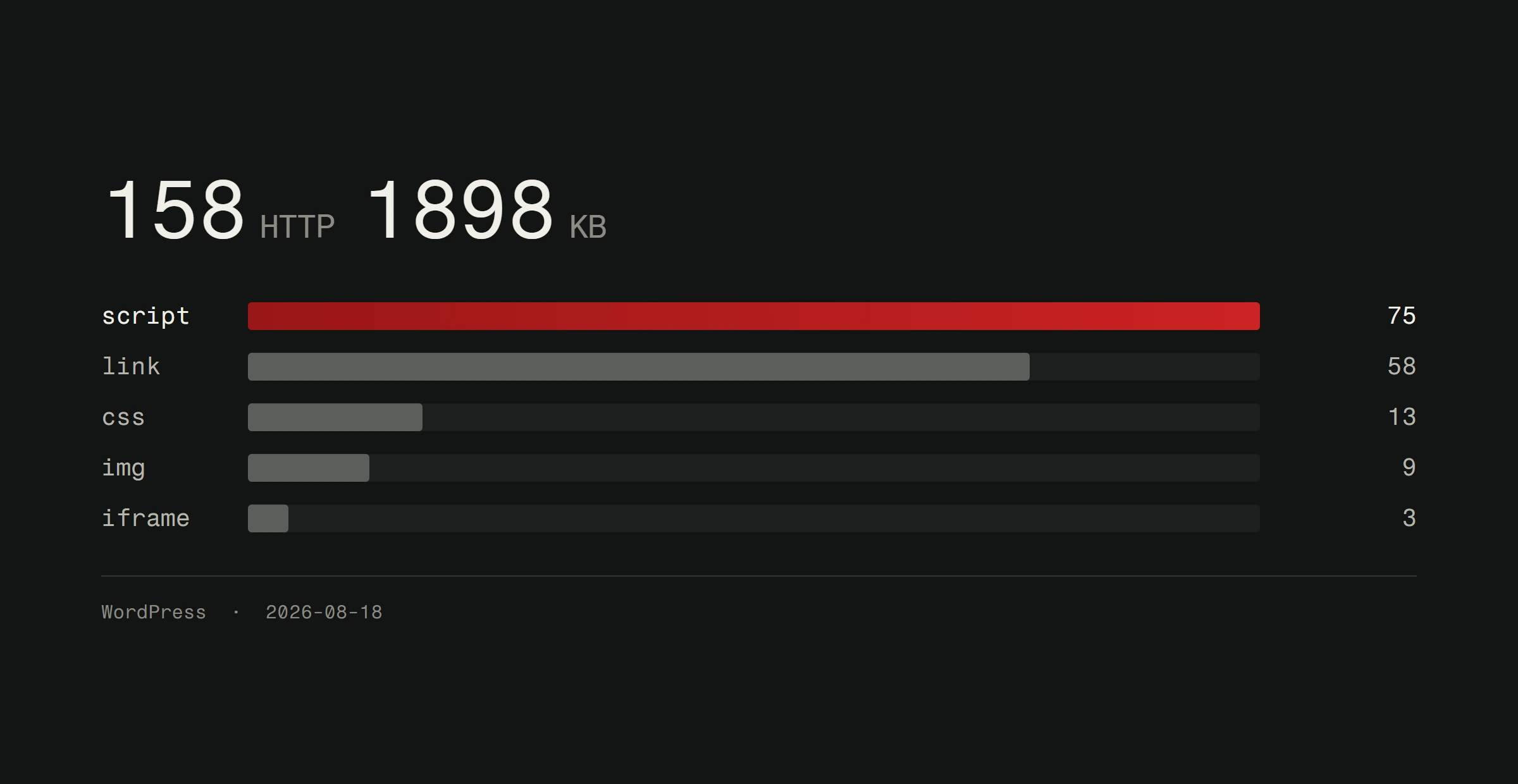
Performance is another issue. Builder sites carry bloat. Extra JavaScript, tracking scripts, platform overhead. This affects your loading speed and your Google ranking. For a personal blog, that's fine. For a business competing for local customers, it matters.
Best for: Personal projects, testing an idea before committing real money, hobby sites.
Option 2: WordPress
WordPress powers roughly 43% of all websites. There's a reason for that. It's flexible, it has a massive ecosystem, and you can get a decent site running without writing code.
The learning curve is steeper than Wix. You need hosting. You need to understand themes, plugins, and basic site management. But thousands of tutorials exist for every problem you'll encounter.
The catch: WordPress needs maintenance. Plugins need updates. Security patches need attention. A neglected WordPress site becomes a security risk fast. We've written about keeping websites secure for exactly this reason.
The plugin ecosystem is both a strength and a weakness. Need a contact form? There are 50 plugins for that. Need SEO tools? Another 30. Each plugin adds code, potential conflicts, and security surface area. Beginners often end up with 20+ plugins doing things they could accomplish with proper development.
Best for: Content-heavy sites, blogs, small business sites where you're willing to learn basic maintenance.
Option 3: Hiring a professional
This is where most business owners should start. Not because DIY is bad. Because your time has value.
Think about it. You'll spend 40-80 hours learning a platform, choosing a template, customizing it, fighting with layouts, optimizing images, figuring out SEO basics. If your time is worth 30 euros an hour, that's 1,200 to 2,400 euros in lost productivity. And the result will still look like a template.
A professional builds something designed specifically for your business. Custom structure. Proper user experience. Clean code that loads fast. Mobile-first design that actually works, not just "kinda fits on a phone."
The objection everyone has: "But it's expensive." Yes, custom development costs more upfront. But you get a site that works as a business tool, not a digital brochure. A site that converts visitors into customers instead of making them squint at a template everyone else is using too. For real numbers, check our website pricing breakdown.
The mistakes beginners always make
Choosing a tool before defining the goal. You don't pick a hammer before you know what you're building. Define what your site needs to accomplish first. Then pick the approach.
Obsessing over design before content. Your site's job is to communicate. If you have a beautiful design with weak content, you have a pretty failure. Write your content first. Design around it.
Ignoring mobile. Over 60% of web traffic comes from phones. If your site doesn't work perfectly on a phone screen, most people will never see it properly. Responsive design isn't optional anymore. It's the default.
Skipping analytics. If you don't measure, you can't improve. Set up Google Analytics from day one. Know where your visitors come from, what they do, and where they leave.
Thinking "done" means done. A website is never finished. It's a living thing that needs content updates, performance checks, and security maintenance. Plan for ongoing work, not just launch day.
How to decide what's right for you
Here's a simple framework.
Go DIY if: You have more time than money, the project is personal or experimental, you enjoy learning new tools, and the stakes are low if it doesn't look perfect.
Hire a professional if: The website represents your business, you need it to generate leads or sales, your time is better spent on your actual work, or you need something that stands out from competitors.
Start with WordPress if: You want a middle ground, you're willing to learn some technical basics, and you plan to maintain it yourself long-term.
There's no shame in any of these paths. The shame is in picking the wrong one and wasting months on something that doesn't serve your goals.
What actually makes a website work
Regardless of how you build it, a good website does four things.
It loads fast. Under 3 seconds, ideally under 2. It works on every device. It communicates clearly what you do and why someone should care. And it makes the next step obvious, whether that's calling you, buying something, or filling out a form.
Templates can do some of that. Custom development can do all of it. Your job is to decide how much "some" is enough for your situation.
Not sure which path fits your business? We build custom websites for companies that need more than a template. Check out our work or get a free website analysis for an honest conversation about what your project actually needs.