
A visitor lands on your site. The page takes four seconds to load. They leave. That is not a hypothetical scenario. It happens thousands of times a day on slow WordPress sites.
Speed is not a nice-to-have feature. It directly affects your bounce rate, your search engine rankings, and your bottom line. Google has been using page speed as a ranking signal for years. Your visitors have zero patience. And every second of delay costs you real money.
So what do you do about it? One popular tool in the WordPress ecosystem is 10Web. Let us break down what it actually does, where it helps, and where it falls short.
Why your WordPress site is slow
Before throwing tools at the problem, you need to understand what causes slowness in the first place.
Unoptimized images. This is the most common culprit. A single hero image that is 3MB will tank your load time no matter what else you do.
Too many plugins. Every plugin adds code. Some add a lot of code. That bloated contact form plugin you installed two years ago? It is probably loading scripts on every single page.
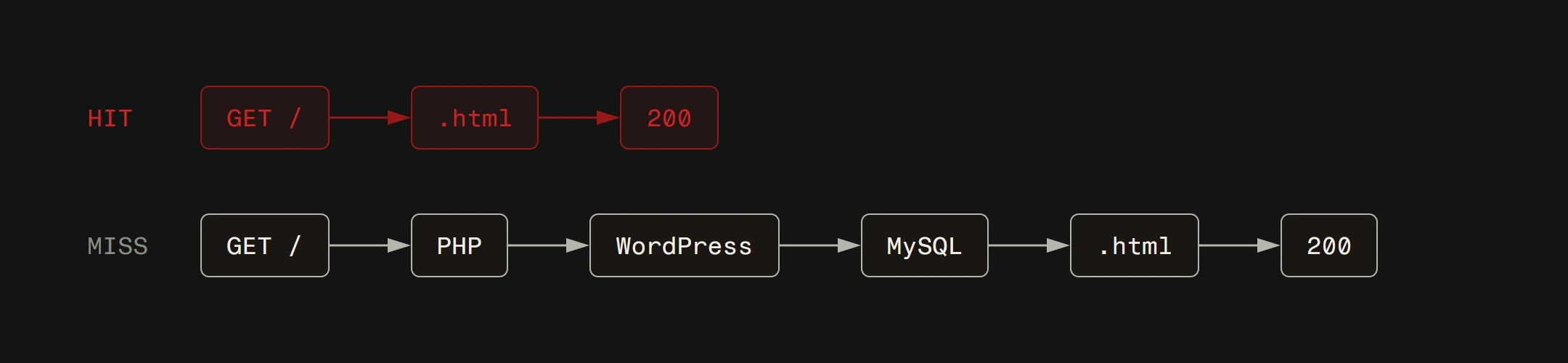
Bad hosting. No amount of optimization will fix a server that takes 800ms just to respond. If your hosting is the bottleneck, start there. We wrote about choosing the right hosting for a reason.
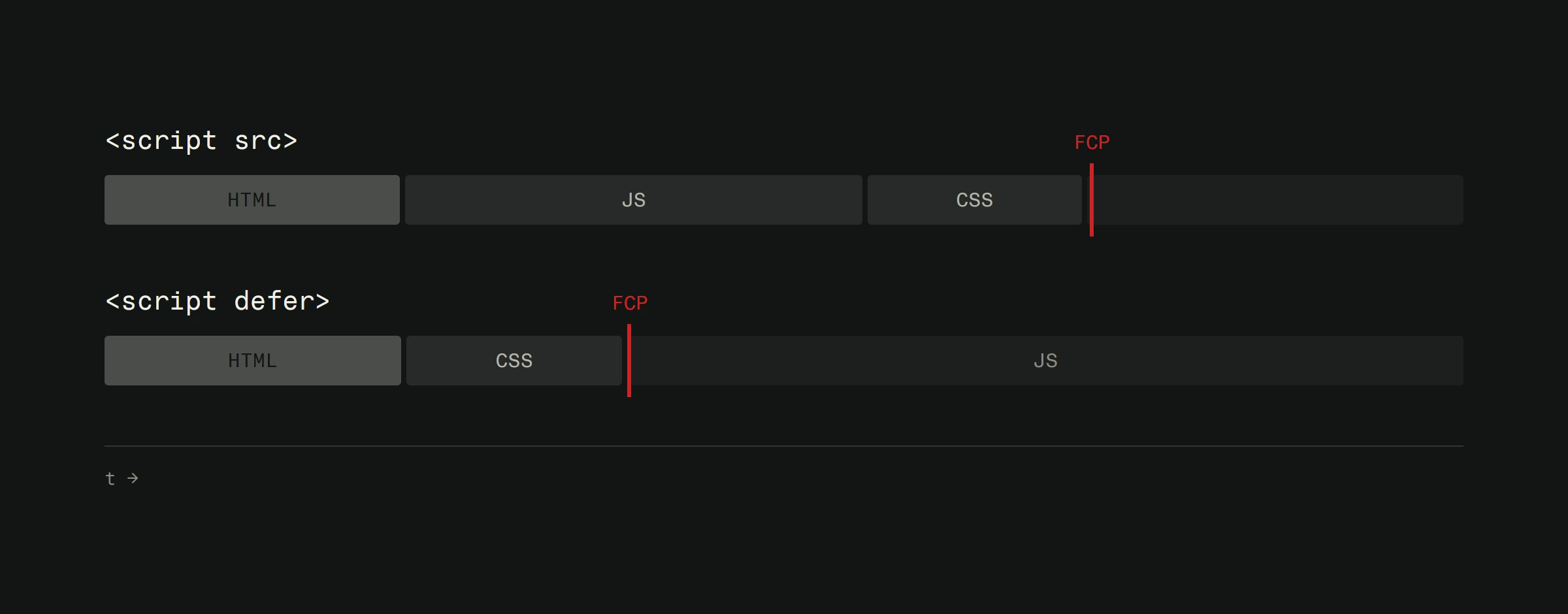
Render-blocking CSS and JavaScript. Your browser cannot paint the page until it finishes loading all the CSS and JS files in the head. Too many of them, or files that are too large, and your visitors stare at a blank screen.
What 10Web actually does
10Web is a WordPress management platform that includes speed optimization as one of its core features. Here is how it tackles the performance problem.
Image compression and conversion. 10Web automatically compresses your images and converts them to modern formats like WebP. This alone can cut your page weight significantly. The key is that it does this without destroying visual quality.
Code minification. It strips unnecessary characters from your CSS and JavaScript files. Whitespace, comments, formatting. All the stuff browsers do not need. Smaller files mean faster downloads.
Critical CSS generation. This is a smart one. Instead of loading all your CSS upfront, 10Web identifies the styles needed for above-the-fold content and inlines them. The rest loads asynchronously. Your visitors see content faster even if the full page has not finished loading.
Cloudflare Enterprise CDN. 10Web offers integration with Cloudflare's enterprise-level CDN as a premium add-on (available with Booster Pro plans). When enabled, your static assets get cached on servers around the world. A visitor in Tokyo loads your site from a nearby server instead of waiting for a response from your origin server in Europe.
Where it helps most
10Web works best on WordPress sites that have never been optimized. If you have been running a site for years without touching performance, installing 10Web can produce dramatic improvements.
We have seen sites go from a PageSpeed score in the 30s to the 80s after proper configuration. That kind of jump translates to real differences in user experience and search engine visibility.
For small business sites, blogs, and portfolio sites running on WordPress, 10Web is a solid tool. It automates the tedious parts of optimization that most site owners never get around to doing manually.
Where it falls short
Here is the honest part.
10Web cannot fix bad architecture. If your theme loads 15 font files, 8 CSS frameworks, and a dozen JavaScript libraries on every page, compression and minification will only do so much. You are putting a bandage on a structural problem.
It cannot fix bad hosting. If your server response time is slow, client-side optimizations have diminishing returns. Fix the foundation first.
It also cannot replace a developer who understands performance at a deeper level. Tools like 10Web handle the surface-level optimizations well. But real performance work means auditing your theme, cleaning up plugin conflicts, implementing lazy loading strategically, and sometimes rewriting code that was never written with speed in mind.
The custom development advantage
This is where we get real. WordPress with plugins and optimization tools will get you to a certain level of performance. For many sites, that level is good enough.
But if you need genuinely fast load times, if your business depends on conversion rates, if you are competing in a space where every millisecond matters, custom development is the answer. A site built that way loads only what it needs. No plugin bloat. No theme overhead. No compromises.
WordPress is a solid starting point. It powers millions of successful businesses. But when you outgrow what plugins can optimize, when you need sub-second load times across every page, custom-built is the next step. We build both ways. For clients with existing WordPress sites, we optimize what is there. For new projects where performance is critical, we build custom. The right approach depends on your goals and budget.
Making 10Web work for you
If you decide to use 10Web, here are the things that matter most:
Run a baseline test first. Use Google PageSpeed Insights or GTmetrix before you change anything. You need a before number to know if your changes actually helped.
Configure image optimization aggressively. Enable WebP conversion. Set compression to a level that balances quality with file size. Most visitors will never notice the difference between 80% and 100% quality JPEG. Your load time will.
Do not skip the CDN setup. The Cloudflare Enterprise integration is available as a premium add-on with 10Web's Booster Pro plans. If your budget allows, it is one of the strongest performance features they offer. Make sure it is active and properly configured.
Test on mobile. Most of your traffic is probably mobile. Optimize for that experience first.
Speed is not optional
A fast site is not a luxury. It is a baseline requirement for being taken seriously online. Whether you use 10Web, another optimization tool, or invest in custom development, the important thing is that you stop ignoring performance.
Your visitors will not wait around while your site loads. Your competitors' sites are already faster. Act accordingly.
Want to know exactly what is slowing your site down? We offer a free website analysis that identifies performance bottlenecks and gives you a clear path to fix them.