Here's something most web companies won't tell you: the work you do to make your site accessible to people with disabilities is almost identical to the work that makes Google rank you higher. Alt text, semantic HTML, clear heading structure, fast load times. Screen readers and search crawlers want the same things.
Yet most businesses treat accessibility as a legal checkbox. A thing you do to avoid lawsuits. That's a mistake. It's actually one of the highest-ROI SEO moves you can make.
What web accessibility actually means
Web accessibility is about making your site usable by everyone. People who are blind and use screen readers. People with motor disabilities who navigate by keyboard. People with cognitive differences who need clear layouts and plain language.
The Web Content Accessibility Guidelines (WCAG) define three levels: A, AA, and AAA. The current version is WCAG 2.2, published in October 2023 and now approved as an international ISO standard. Most legal requirements target AA. But even hitting basic A-level compliance puts you ahead of the vast majority of websites. WebAIM's 2025 analysis of one million homepages found that 94.8% had detectable WCAG failures, with an average of 51 errors per page.
Where accessibility and SEO overlap
This is where it gets interesting. Google can't "see" your website. It reads code. And the things that help Google understand your content are the same things that help assistive technology understand it.
Alt text on images
Every image on your site should have descriptive alt text. Screen readers announce this text to blind users. Google uses it to understand what your images show. If your alt text says "IMG_4382.jpg" you're helping nobody. Write something like "Responsive website design on laptop and mobile showing navigation menu."
This also gets your images into Google Image Search. That's free traffic most businesses completely ignore.
Semantic HTML structure
Using proper HTML elements (h1 through h6 in order, nav for navigation, main for primary content, article for blog posts) tells both screen readers and Google what your content hierarchy looks like. A div soup with CSS styling might look fine visually. But to a crawler or screen reader, it's meaningless noise.
If your SEO basics are solid but your HTML is a mess of generic divs, you're leaving ranking potential on the table.
Heading hierarchy
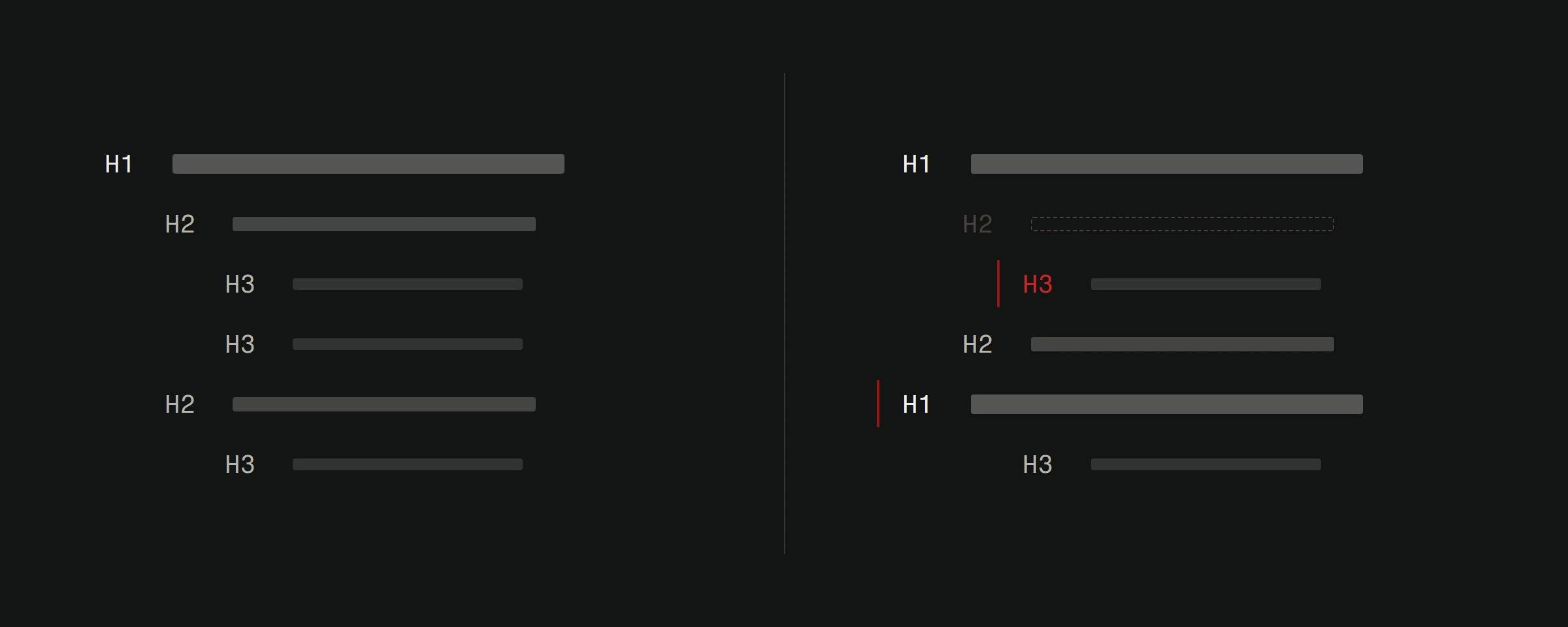
One H1 per page. H2s for major sections. H3s for subsections. Never skip levels. This is accessibility 101 and also exactly what Google uses to understand your content structure. Most sites we audit have broken heading hierarchies. Sometimes there are three H1 tags. Sometimes the H2s come before the H1. It's chaos, and it hurts both accessibility and rankings.
Video transcripts and captions
Transcripts make video content accessible to deaf and hard-of-hearing users. They also give Google a massive chunk of indexable text content. A 10-minute video might produce 1,500 words of transcript. That's an entire blog post worth of keyword-rich content that Google can crawl.
Keyboard navigation
If your site can't be used without a mouse, it fails accessibility standards. But keyboard navigability also correlates with clean, logical site structure. Sites that work well with keyboard navigation tend to have better internal linking, clearer focus states, and more predictable layouts. All things that reduce bounce rates and increase time on page.
The business case in numbers
Beyond rankings, accessibility expands your potential audience significantly. According to the WHO, about 16% of the world's population (1.3 billion people) experiences a significant disability. In the EU, the European Accessibility Act (EAA) became enforceable on June 28, 2025. It covers specific products and services, e-commerce among them, rather than every website, and micro-enterprises that provide services are exempt. Croatia, as an EU member, falls under it. Penalties for non-compliance are set by each member state.
That means accessibility isn't just good SEO practice. It's the law.
But forget the legal angle for a moment. Sites that invest in accessibility consistently see:
- Lower bounce rates (clearer layouts keep everyone engaged longer)
- Higher conversion rates (forms that work with assistive tech work better for everyone)
- Better Core Web Vitals scores (accessibility improvements often fix performance issues)
- More backlinks (accessible content gets shared more widely)
A practical accessibility audit for SEO
Here's a quick checklist you can run on your site today. It takes about 30 minutes and covers the highest-impact items.
Images: Does every meaningful image have descriptive alt text? Are decorative images marked with empty alt attributes?
Headings: Is there exactly one H1? Do headings follow a logical hierarchy without skipping levels?
Color contrast: Does your text meet a 4.5:1 contrast ratio against its background? Use WebAIM's contrast checker to test.
Keyboard access: Can you tab through your entire site without a mouse? Can you see where focus is at all times?
Forms: Do all form inputs have associated labels? Do error messages clearly explain what went wrong?
Links: Does every link have descriptive text? No "click here" or "read more" without context.
Page speed: Does your site load in under 3 seconds? Slow sites fail both accessibility and speed optimization standards.
Run your pages through Google Lighthouse (built into Chrome DevTools) and check both the Accessibility and SEO scores. If either is below 90, there's work to do.
Tools that help
axe DevTools (free browser extension): Catches WCAG violations directly in your browser. More accurate than most automated tools.
WAVE (wave.webaim.org): Visual overlay showing accessibility issues on any page. Great for quick checks.
Google Lighthouse: Built into Chrome. Scores accessibility and SEO together, which is exactly the point.
Screen reader testing: Try navigating your site with VoiceOver (Mac) or NVDA (Windows, free). Nothing reveals accessibility problems faster than actually experiencing them.
The overlap is the opportunity
Most of your competitors treat accessibility and SEO as separate projects. Different teams, different budgets, different timelines. That's wasteful.
When you treat them as one project, every improvement pulls double duty. Your SEO checklist and your accessibility checklist should be the same document. The work compounds.
Build your site right for people who need assistive technology, and Google rewards you for it. That's not a coincidence. It's how the web was designed to work.
Want to know how your site scores on both accessibility and SEO? We offer a free website analysis that covers both. One audit, twice the value.