Quick test: Google your business name right now. If you don't see a panel on the right side (desktop) or top (mobile) showing your address, hours, photos, and reviews, you're invisible to local searchers. And if you do see it but the information is incomplete or outdated, you're actively losing customers.
Google Business Profile (formerly Google My Business, or GMB) is the single most impactful thing a local business can do for online visibility. It's free. It takes about an hour to set up properly. Yet most businesses either skip it entirely or fill in the bare minimum and forget about it.
What Google Business Profile actually does
When someone searches "restaurant near me" or "web design Zadar," Google shows a map pack: three local businesses with their ratings, hours, and locations. These map results appear above the regular organic results. Above them.
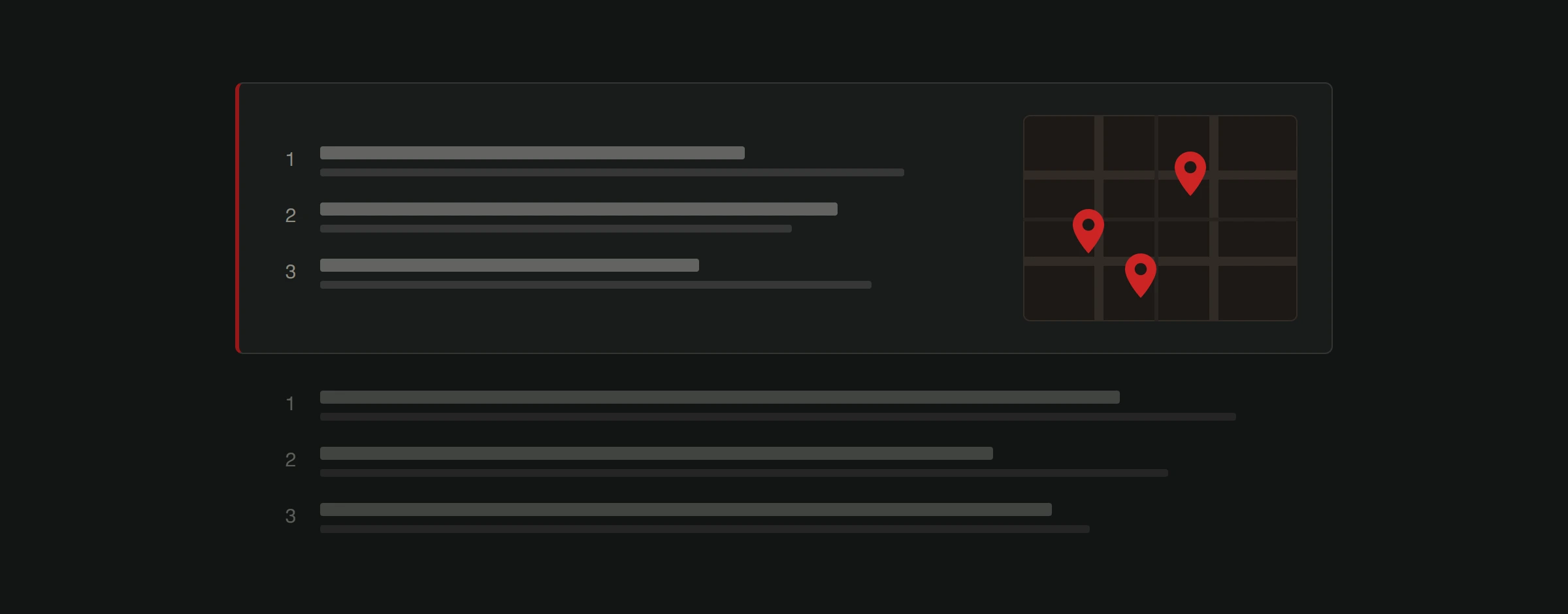
Your Google Business Profile is what puts you in that map pack. Without one, you don't exist in local search. With a half-complete one, you exist but look unprofessional next to competitors who've filled theirs out properly.
Your profile also appears in Google Maps directly. When tourists or locals search Maps for businesses in an area, your profile determines whether they find you, what they see about you, and whether they choose you over the place next door.
Setting up your profile right (not just "doing it")
Creating a profile is easy. Creating one that actually performs takes more care.
Claim and verify your business
Go to business.google.com. Search for your business. If it already exists (Google often creates listings automatically from web data), claim it. If not, create it. Verification usually happens by postcard, phone, or email. This typically takes a few days.
If you skip verification, anyone can suggest edits to your listing. Including competitors. Verify it.
Fill in every single field
Google rewards completeness. Every empty field is a missed opportunity.
Business name: Your actual business name. Not "Best Pizza Zadar | Free Delivery | Open Late." Google penalizes keyword stuffing in business names and can suspend your listing for it.
Category: Choose the most specific primary category available. "Italian Restaurant" ranks better for Italian food searches than just "Restaurant." You can add up to 9 secondary categories. Use them.
Address and service area: If customers visit you, show your address. If you serve customers at their location, define your service area instead. If both, do both.
Hours: Include regular hours, holiday hours, and special hours. Nothing kills trust faster than driving to a business listed as "open" that's actually closed.
Phone number: Use a local number, not a toll-free one. Local numbers correlate with better local rankings.
Website URL: Link to your homepage or a location-specific landing page if you have multiple locations. Note: Google removed the built-in Chat feature from Business Profiles in 2025, but added the option to connect your profile to WhatsApp for real-time customer messaging.
Business description: 750 characters max. Use natural language. Describe what you do, who you serve, and what makes you worth choosing. Don't stuff keywords.
Services/menu: If applicable, add your full service list or menu. This content is searchable and appears in your profile.
Add photos (real ones)
Profiles with photos get 42% more requests for directions and 35% more clicks to websites than those without. Those are Google's own numbers.
Upload at least 10 to 15 photos. Include your exterior (so people can find you), interior, team, products or work samples, and any distinctive features. Use real photos, not stock images. People can tell the difference and Google can too.
Update photos monthly. A profile with fresh images signals an active, current business.
Write your opening post
Google Business Posts are underused. They appear directly in your profile and give you a way to highlight current promotions, events, or updates. Think of them as a mini social media feed that shows up when someone is actively searching for your type of business.
Post at least once a week. Posts expire after 7 days for standard posts (event posts last until the event date). Keep them short, include an image, and add a call to action button. As of 2026, Google also supports scheduling posts in advance, making it easier to maintain a consistent presence.
Reviews: The ranking factor most businesses mismanage
Reviews are the most influential element of your Google Business Profile. They affect both your ranking in the map pack and whether someone actually clicks on your listing.
How reviews affect rankings
Google considers three review signals:
- Review count. More reviews generally means better visibility.
- Review score. Higher average ratings rank better, but a perfect 5.0 can look suspicious. A 4.6 to 4.8 range actually performs best.
- Review velocity. Getting reviews steadily over time beats getting 30 in one week then nothing for months. Sudden spikes look fake to Google.
Getting more reviews
Most happy customers won't leave a review unless you ask. Create a direct review link (Google provides this in your Business Profile dashboard) and share it:
- In follow-up emails after a service is completed
- On printed receipts or thank-you cards
- Via a QR code at your physical location
- In your email signature
Don't offer incentives for reviews. Google prohibits this and can remove reviews it considers incentivized.
Responding to reviews
Respond to every review. Every single one.
For positive reviews: Thank the customer by name. Mention something specific about their experience. Keep it brief.
For negative reviews: Respond publicly, professionally, and quickly. Acknowledge the issue. Offer to resolve it offline. Never argue. Your response isn't just for the unhappy customer. It's for every future customer reading that review to see how you handle problems.
Businesses that respond to reviews rank higher than those that don't. Google has confirmed that review responses factor into local ranking.
Optimizing for local search rankings
Your Google Business Profile is the foundation of local SEO, but it doesn't work in isolation. Several factors determine your map pack position.
Relevance
How well your profile matches what someone searched for. This is why category selection and business description matter so much. If someone searches "web design" and your primary category is "Marketing Agency," you're less relevant than a competitor categorized as "Web Designer." Staying on top of Google's algorithm changes helps you understand how relevance signals evolve over time.
Distance
How close your business is to the searcher. You can't change your location, but you can ensure your address and service area are accurate so Google shows you for the right geographic queries.
Prominence
How well-known your business is. This combines online reviews, backlink profile, citation consistency, and overall web presence. A business mentioned on 50 local directories with consistent information outranks one listed on 5.
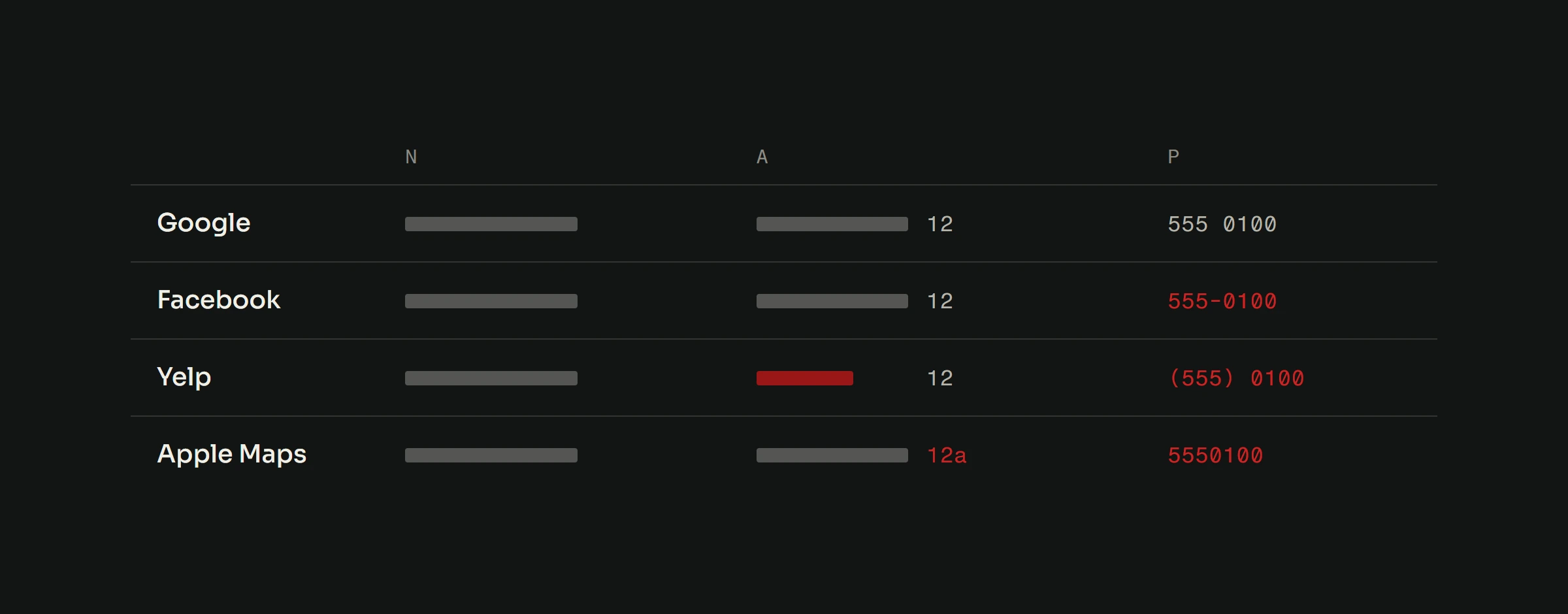
Build citations (mentions of your business name, address, and phone number) on relevant directories: Google, Bing Places, Apple Maps, local Chamber of Commerce sites, and industry-specific directories. Consistency is critical. If your address says "Street" on Google and "St." on Yelp, that inconsistency works against you.
Common mistakes that hurt your profile
Multiple listings for one location. This confuses Google and splits your reviews. Find and merge duplicate listings.
Keyword-stuffed business name. "Mike's Plumbing | Best Plumber | Emergency Plumber Zadar" will get your profile suspended. Use your real business name only.
Ignoring questions about your business. Google has replaced the traditional Q&A section with "Ask Maps," where Gemini AI generates answers by scanning your profile, website, and reviews. This makes it even more critical that your profile information, website content, and review responses are accurate and thorough, since AI is now pulling from all of these sources to answer customer questions automatically.
Outdated hours. Especially during holidays. If someone drives to your location and finds you closed when Google said you're open, that's a one-star review waiting to happen.
No posts. An inactive profile signals an inactive business. A competitor posting weekly looks more engaged and current.
Tracking your profile's performance
Google Business Profile includes built-in analytics. Check these monthly:
- Search queries: What terms people used to find you. This feeds into your broader keyword strategy. You can also explore how Google Discover optimization opens another free traffic channel beyond traditional search.
- Customer actions: Calls, direction requests, website clicks. These are actual leads.
- Photo views: How your photos compare to businesses like yours.
- Review trends: Monitoring score and volume over time.
If you're not tracking these, you're guessing about what works. Stop guessing.
Pair it with your website SEO
Your Google Business Profile and your website SEO should reinforce each other. Your website should include your business name, address, and phone number (NAP) in a consistent format, ideally in structured data markup. Your profile should link to your website. Your website content should target the same local keywords that bring people to your profile.
This is part of a complete SEO strategy. The profile gets you visibility in map results. Your website gets you visibility in organic results. Together, you can own significant real estate on page one.
Your Business Profile sends people to your website, so the site has to be ready when they arrive. Our free website analysis checks that: a developer goes through your site by hand and sends back what to fix first, ranked by impact, within 48 hours.