What We Need From You Before We Start Building Your Website

A website project kicks off long before anyone opens a code editor. Here's exactly what to prepare so the entire process runs smoothly.

A website project doesn't start when a developer opens a code editor. It starts with a conversation. And the better prepared you are for that conversation, the better the result.

We've seen projects stall for weeks because basic information wasn't gathered upfront. We've also seen projects fly through development because the client walked in with everything organized. The difference is almost always preparation, not talent or budget.

Here's what to have ready. Not all of it is required on day one. But the more you bring to the table, the faster and smoother things go.

Your Brand Identity

We need to understand who you are before we can represent you online.

Logo files. Vector format (SVG or AI) is ideal. High-resolution PNG works if that's what you have. A tiny JPEG ripped from your Facebook page does not. If you don't have a proper logo yet, that's okay. But it needs to happen before the design phase starts.

Brand colors. If you have specific hex codes or Pantone values, share them. If you just know "blue and white," that's a starting point. Existing brand guidelines with color palettes save everyone time.

Typography. Do you use specific fonts in your print materials, business cards, or other marketing? Consistency between print and web builds brand recognition. If you don't have established fonts, we'll recommend ones that fit your identity. Our guide on choosing the right font covers what to look for.

Tone of voice. Are you formal and corporate? Casual and friendly? Technical and precise? The way you communicate shapes every piece of text on the site. If you have a brand guide that covers this, send it over.

The more brand material you provide, the less guesswork there is. Guesswork leads to revisions. Revisions eat time and budget.

What the Website Needs to Do

This sounds obvious. It's not. "We need a website" is not a goal. "We need a website that generates 50 qualified leads per month" is a goal.

Primary purpose. Is this a brochure site that explains your services? An e-commerce store that sells products? A lead generation machine with forms and CTAs? A portfolio that showcases your work? Each purpose leads to very different design and technical decisions.

Target audience. Who are you trying to reach? Age, location, technical comfort level, and buying behavior all influence design choices. A site for retirees looks and works differently than one for developers.

Key actions. What should visitors do? Buy something. Fill out a form. Call you. Book an appointment. Download a resource. Every page should drive toward one of these actions. Knowing them upfront shapes the entire site architecture.

Competitor references. Show us 3-5 websites you like. Not necessarily competitors. Just sites where you think "I want something like that." This is worth a thousand words of description. Also show us what you don't like. Knowing what to avoid is equally valuable.

Your Content

Content is the single biggest bottleneck in web projects. It's also the thing clients are least prepared for.

Text. Every page needs copy. Homepage, about, services, contact, product descriptions. If you can provide polished text, the project moves fast. If you need help with copywriting, factor that into the timeline and budget.

Images. Real photos of your team, office, products, and work beat stock photography every time. Professional photos are ideal but good smartphone shots work in a pinch. What doesn't work: blurry images, watermarked stock photos, or images smaller than 1000px wide.

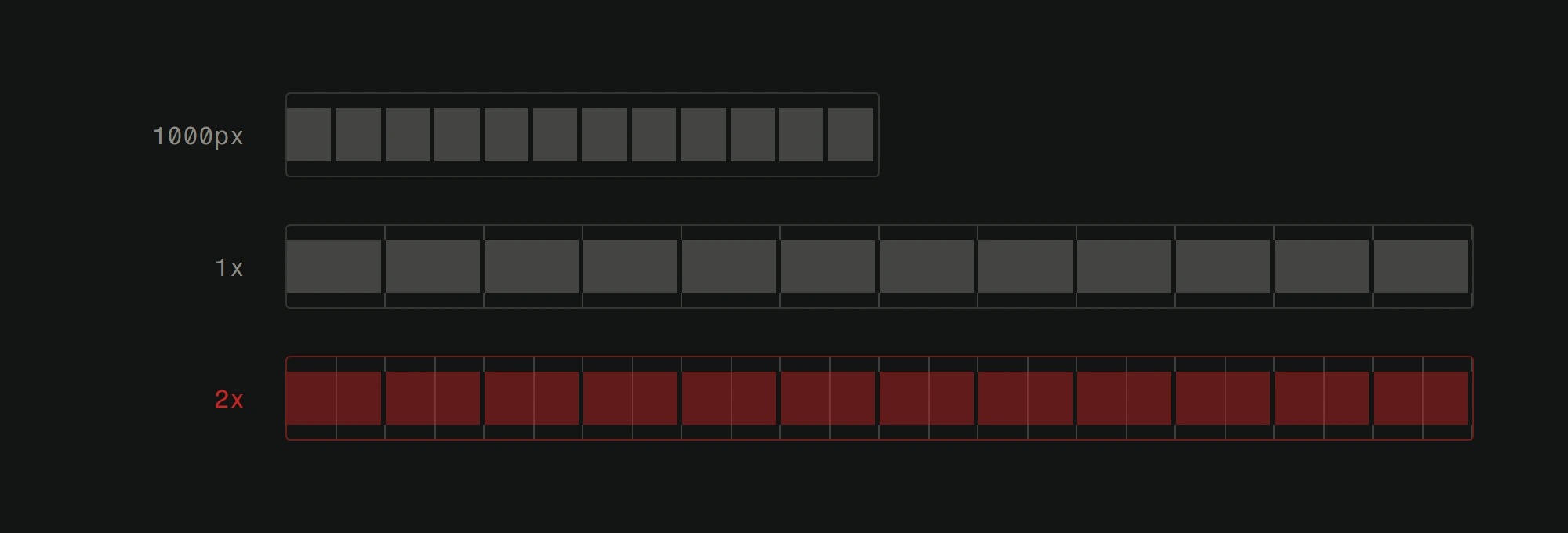
A source image shown as twelve blocks, then placed into the same slot twice. On a 1x display the slot has twelve divisions and each block covers one. On a 2x display the slot has twenty four divisions and each block has to cover two.
Why the floor for photographs is a number and not a preference. The file never gains detail by being displayed, so on the phone screen in your pocket every source pixel is being asked to cover two. Send the biggest original you have, not the one that already looks right on your laptop.View full-size image

Videos. If you have video content, share it early. Video affects page layout, loading strategy, and hosting decisions.

Documents and downloads. Menus, brochures, spec sheets, anything visitors might download. These need to be ready in final form.

Here's the hard truth: waiting for content is the number one reason web projects miss deadlines. Start gathering it the moment you decide to build a new site. Don't wait until the designer asks for it.

Technical Details

You don't need to be technical. But you do need answers to some technical questions.

Domain name. Do you already own one? Who manages it? What's the registrar login? If you need a new domain, have a few options in mind. Good domains are getting harder to find.

Current hosting. If you have an existing site, where is it hosted? Do you have login credentials? Migration planning depends on knowing what exists.

Email. Do you use business email (@yourdomain.com)? Changing hosting or domains can affect email. We need to know what's in place to avoid disrupting it.

Integrations. Does the site need to connect to anything? A CRM like HubSpot. An email marketing tool like Mailchimp. A booking system. A payment gateway. An inventory management system. Each integration adds scope. List them all, even the "nice to have" ones.

Analytics. Do you have Google Analytics, Search Console, or any tracking already set up? Preserving historical data matters.

Choosing the right CMS is a technical decision we'll make together, based on your needs and comfort level with managing content.

Sitemap and Structure

You don't need a full sitemap. But an idea of what pages you need helps enormously.

Start simple. List every page you think the site needs. Homepage. About. Services (and sub-pages for each service?). Portfolio. Blog. Contact. Pricing. FAQ.

Then think about hierarchy. What's most important? What should be in the main navigation? What can live in the footer? How should services be organized?

If you have an existing site, review it critically. What pages get traffic? What pages do visitors ignore? What content is missing? Your analytics data (if you have it) answers these questions with facts instead of assumptions.

A clear structure makes the user experience better from day one. It also makes the project easier to estimate.

Timeline and Budget

Be honest about both.

Timeline. When do you need this live? Is there a hard deadline (product launch, seasonal event) or is it flexible? Rushed timelines are possible but they cost more and leave less room for iteration.

Budget. You don't need an exact number. But a realistic range helps us scope the project appropriately. A 2,000 EUR budget and a 20,000 EUR budget lead to very different websites. Both can be excellent at their price point, but only if we design for that constraint from the start.

If you're unsure about what a website costs, our pricing tool gives you a ballpark based on your specific requirements.

What Happens When You're Not Prepared

Projects that start without this information don't fail. But they struggle.

Design goes through more revisions because the vision wasn't clear. Development stalls waiting for content. Integrations are discovered mid-build, expanding scope and budget. Launch dates slip.

Spending a week gathering this information before the project starts can save a month of back-and-forth during development. It's the highest-ROI preparation you'll ever do.


Getting ready to build a new website? Gather what you can from this list and reach out. The more prepared you are, the better the result.

Share this article

Related articles

ContactWhatsApp