
Most blog posts never get a single visitor from Google. Not because blogging doesn't work. Because most posts are written for the author, not for the reader searching for answers.
SEO writing is about one thing: matching search intent with useful content, packaged in a way Google can parse and rank. Here's how to do it right.
Find the right keyword before you write a single word
Every blog post should target one primary keyword. Not three. Not whatever sounds good. One specific term that people actually search for.
Use keyword research tools. SEMrush, Ahrefs, and Google Keyword Planner show you monthly search volume, keyword difficulty, and related terms. You want keywords with decent search volume and a difficulty score you can realistically compete with.
Understand search intent. This is where most people fail. A keyword like "web design" could mean anything. Does the searcher want to learn web design? Hire a web designer? See examples? Your content needs to match what the searcher actually wants.
The four types of search intent:
- Informational. The person wants to learn something. "How does SEO work?"
- Navigational. They're looking for a specific site. "Ahrefs login."
- Commercial. They're researching before buying. "Best web design company Croatia."
- Transactional. They're ready to act. "Hire web designer Zadar."
Blog posts typically target informational and commercial intent. Match the intent, or Google won't rank you no matter how well-written the post is.
Go long-tail. Instead of targeting "SEO" (impossibly competitive), target "how to improve local SEO for restaurants." Less traffic per keyword, but much higher chances of ranking and the traffic is more qualified. Learn more about finding the right terms in our keyword selection guide.
Write a title that gets clicks and rankings
Your title tag does double duty. It tells Google what the page is about, and it convinces searchers to click your result over the nine others on the page.
Rules for effective titles:
Include your primary keyword near the front. "How to Write SEO Blog Posts" is better than "A Complete Guide to Writing Posts That Are Optimized for Search Engines."
Keep it under 60 characters. Anything longer gets cut off in search results. You'll see "..." instead of your carefully crafted title.
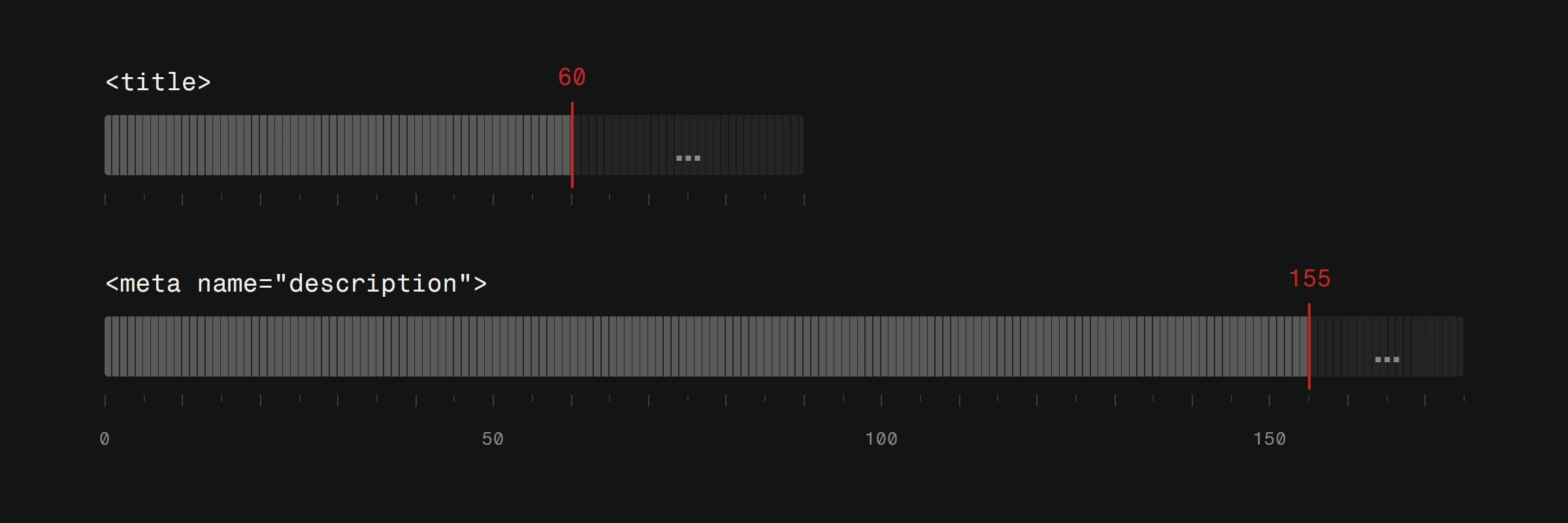
Make it specific. "7 Ways to Speed Up Your Website" beats "Tips About Website Performance." Numbers, specifics, and clear outcomes attract clicks.
Promise value the post delivers. Clickbait titles get clicks but increase bounce rate. If your title promises "the complete guide" and the post is 300 words, Google notices that people leave quickly and adjusts your ranking accordingly.
Structure your post for humans and robots
Google's crawlers and human readers both benefit from clear content structure. Good structure isn't just SEO. It's good writing.
Use one H1 tag. That's your title. One per page. Non-negotiable.
Use H2s for major sections. Think of them as chapter titles. Each H2 should cover a distinct subtopic related to your primary keyword.
Use H3s for subsections. Under each H2, H3s break the content into scannable chunks. Most online readers scan before they read. Headers help them find what they need.
Keep paragraphs short. Two to three sentences max. Walls of text kill readability and increase bounce rate.
Use lists and bold text. Bullet points make information digestible. Bold text draws the eye to key points. Both help scanners become readers.
Include a table of contents for long posts. If your post is over 1500 words, a linked table of contents helps users jump to what they need. Google sometimes pulls these into featured snippets too.
Nail the meta description
The meta description is the two-line summary below your title in search results. Google doesn't use it as a direct ranking factor, but a compelling meta description increases your click-through rate. And click-through rate does affect rankings.
Keep it under 155 characters. Longer gets truncated.
Include your primary keyword. Google bolds matching terms in the meta description, making your result more visually prominent.
Write it like ad copy. You have two sentences to convince someone your result is the one worth clicking. Be specific about what they'll learn or get.
Don't duplicate meta descriptions. Every page needs a unique one. If you skip it, Google auto-generates one from your page content, and it's usually worse than what you'd write.
Place keywords intentionally, not obsessively
There was a time when cramming your keyword into every other sentence worked. That time ended around 2012. Google is sophisticated enough to understand context, synonyms, and related terms.
Knowing where to place keywords is one part of using SEO effectively on your site. Where your primary keyword should appear:
- Title tag
- H1 heading
- URL slug
- First 100 words of the post
- At least one H2 heading
- Meta description
- Image alt text (where genuinely descriptive)
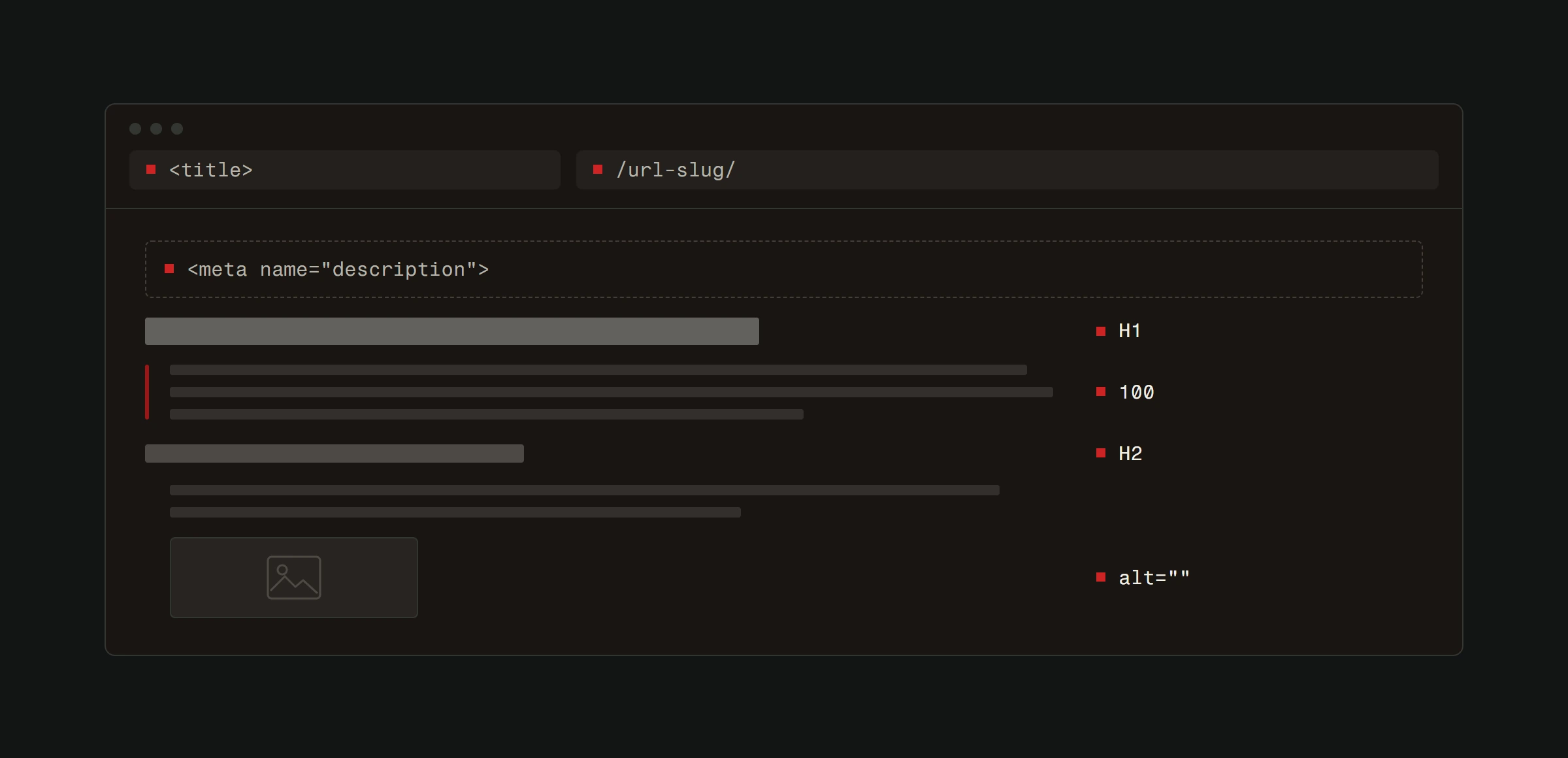
Where it doesn't need to appear: every paragraph, every heading, and every sentence. Write naturally. If you find yourself awkwardly forcing a keyword in, don't. Google understands semantic variations. "SEO-optimized blog posts," "blog posts for SEO," and "writing blogs that rank" all signal the same topic.
Use related keywords. Sprinkle in synonyms and related terms naturally throughout the post. If your primary keyword is "SEO blog posts," related terms might include "content optimization," "search rankings," "organic traffic," and "keyword targeting." This helps Google understand the full topic your post covers.
Link strategically
Internal and external links both matter. They serve different purposes, but skipping either one is a missed opportunity.
Internal links connect your content into a web that Google can crawl and understand. Every blog post should link to 2-4 other relevant pages on your site. Writing about keywords? Link to your SEO basics guide. Mentioning page speed? Link to your speed optimization post.
Internal links keep visitors on your site longer, reduce bounce rate, and distribute page authority across your pages. They also signal to Google which pages are most important.
External links to authoritative sources show Google you've done your research and your content exists within a broader information ecosystem. Link to studies, official documentation, and reputable sources. Don't link to competitors' service pages, but do link to genuinely useful resources.
Anchor text matters. The clickable text of a link should describe where it leads. "Click here" tells Google nothing. "Our SEO checklist guide" tells Google exactly what the linked page is about.
Optimize your images
Images break up text, illustrate concepts, and improve user experience. They also present SEO opportunities most people ignore.
Compress every image. Large images slow your page down, and page speed affects rankings. Use WebP format where possible. Aim for images under 100KB without visible quality loss.
Write descriptive alt text. Alt text describes the image for screen readers and search engines. "Bar chart showing organic traffic growth over 12 months" is useful. "Image" or "chart1" is not.
Use descriptive filenames. seo-blog-post-structure.webp tells Google what the image contains before it even looks at the alt text. IMG_4392.jpg tells it nothing.
Add captions where helpful. Captions are among the most-read text on a page. If a caption can include your keyword naturally, that's a bonus.
Publish, then promote and update
Hitting publish is the halfway point, not the finish line.
Promote the post. Share it on your social channels. Send it to your email list. Mention it in relevant online communities where it adds value (not just self-promotion).
Build backlinks. Reach out to people who've linked to similar content. Guest post on relevant sites and link back to your article. Our backlinks guide covers this in detail.
Update regularly. Google favors fresh content. Set a reminder to revisit your top-performing posts every 6 months. Update stats, add new sections, refresh examples. A post that keeps getting better keeps ranking higher.
Monitor performance. Use Google Search Console to see which queries bring traffic to your post. If you're ranking on page 2 for a valuable keyword, a content update might push you to page 1.
The real secret to SEO writing
Write for people first. Optimize for Google second. If your post genuinely helps someone solve a problem, the SEO mechanics amplify that quality. If your post is thin, generic, or unhelpful, no amount of keyword placement will save it. For a deeper look at how blogging and SEO reinforce each other, read our guide on leveraging SEO through blog writing.
Google's entire business model depends on showing users the best result. Be the best result.
Good posts need a site that search engines can read properly. Start with a free website analysis: a developer goes through your site by hand and sends back what to fix first, ranked by impact, within 48 hours.