How Websites Get Built: The Process You Should Know

Building a website looks like magic from the outside. Here is what actually happens during each phase, why it takes time, and where things go wrong.

From the outside, building a website looks like magic. You talk to some developers, wait a few weeks, and a finished site appears. From the inside, it's a sequence of very deliberate steps. Each one builds on the last.

Understanding this process won't make you a web developer. But it will make you a better client. You'll know what to expect, when to give feedback, and why certain phases take longer than others.

Here's how it actually works.

Phase 1: Discovery and Strategy

This is the most important phase. It's also the one clients want to rush through.

We sit down and figure out what your website needs to accomplish. Not what it should look like. What it should do. Those are different questions with different answers.

During discovery, we cover your business goals, your target audience, your competitors, and your content situation. We review what's working on your current site (if you have one) and what's failing.

The output is a project brief. It defines scope, sitemap, feature list, timeline, and budget. Everything that follows is built on this document. Rush it, and you'll pay for it later with revisions that could have been avoided.

This phase typically takes 1-2 weeks. If your project is large or complex, it might take longer. That's normal.

Phase 2: Design

Design isn't decoration. It's problem-solving with pixels.

We start with wireframes. These are rough layouts that show where content goes on each page type. No colors, no fonts, no images. Just structure. Wireframes let us test navigation and content hierarchy before anyone gets attached to how things look.

Once wireframes are approved, we move to visual design. This is where color choices, typography, spacing, and overall visual direction come together. We design key pages first (usually homepage, one interior page, and one content page) and build the rest from those established patterns.

Good design makes things feel obvious. Buttons look clickable. Important information stands out. Navigation makes sense without instructions. This is the user experience part, and it separates professional sites from DIY ones.

Expect 2-3 rounds of revision during this phase. That's not a sign of failure. It's how design works. You see something, react to it, and we refine together.

Phase 3: Development

Now the design becomes a real website. This is where code gets written.

Development has two layers. Front-end is everything users see and interact with: the layout, animations, forms, responsive behavior on different screen sizes. Back-end is everything behind the scenes: content management, databases, server logic, integrations with external services.

During development, we're thinking about things you'll never see but will definitely feel. Page load speed. Accessibility for users with disabilities. Clean code that won't become a maintenance nightmare in two years.

We build responsive behavior from the start, not as an afterthought. Your site needs to work on a phone, a tablet, a laptop, and a large monitor. That's not four different sites. It's one site that adapts intelligently.

This phase is usually the longest, taking 2-4 weeks depending on complexity. You'll get progress updates, but this is mostly heads-down work on our end.

Phase 4: Content Integration

Here's where prepared clients pull ahead. If your content is ready, this phase takes days. If it isn't, the entire project stalls.

We take your text, images, videos, and other media and integrate them into the built site. This isn't just copy-pasting. Content gets formatted, optimized for search engines, and tested to make sure it reads well on all screen sizes.

Images get compressed without visible quality loss. Heading hierarchy gets structured for SEO. Alt text gets written. Meta descriptions get crafted. These details are invisible to most visitors but critical for search performance.

Phase 5: Testing

Testing is not optional. It's not something we rush through on launch day. It's a dedicated phase with a checklist.

We test on multiple browsers: Chrome, Firefox, Safari, Edge. We test on multiple devices: phones (iOS and Android), tablets, laptops, desktops. We test forms, links, load times, error states, and edge cases.

We check accessibility. Can someone navigate the site with a keyboard? Do screen readers make sense of the content? Are contrast ratios sufficient for readability?

We test performance. How fast does the homepage load on a 3G connection? What's the Largest Contentful Paint score? How large is the total page weight? These metrics directly affect both user experience and Google rankings.

If we find issues, and we always do, we fix them before launch. Not after. Launching a site with known bugs is something we don't do.

Phase 6: Launch

Launch day is exciting but anticlimactic if you've done everything right. The site goes live, DNS propagates, and within hours your new website is serving visitors.

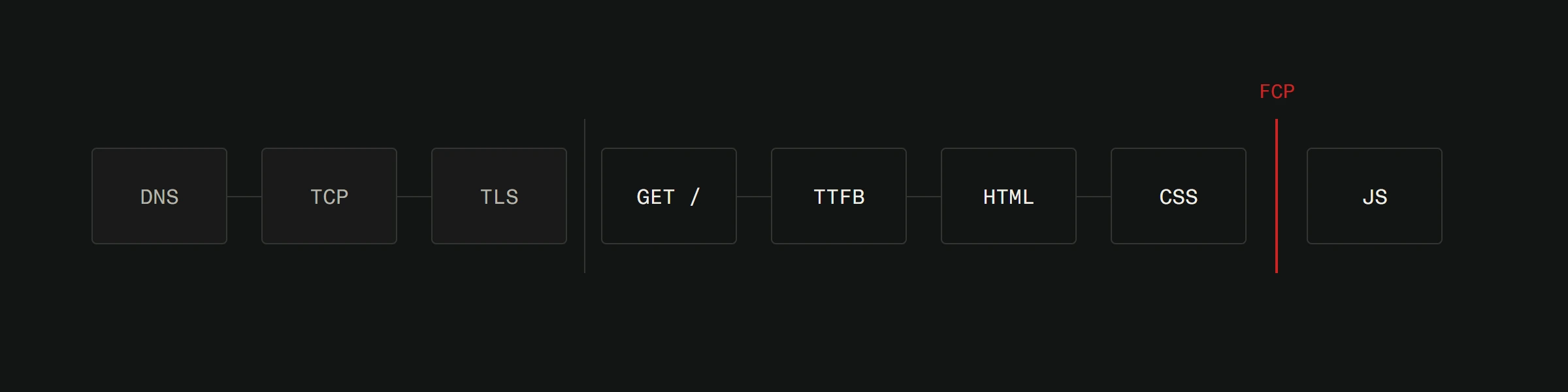
Nine stages in order from a tap to a first paint: DNS, TCP and TLS set apart on the left, then GET /, TTFB, HTML, CSS, a marked first contentful paint, and JS last. All stages are drawn the same width, so the figure shows order rather than duration.
Launch day in one line. DNS is the first box, which is why a switch that looks instant from the inside reaches visitors gradually.View full-size image

Before we flip the switch, we run through a final checklist. SSL certificate active. Redirects from old URLs configured. Analytics tracking installed. Sitemap submitted to search engines. Backup of the old site archived.

We monitor the site closely for the first 48 hours. If anything breaks in production that didn't break in testing (rare but possible), we fix it immediately.

After Launch

A website isn't a poster you hang on the wall and forget about. It's a living thing that needs attention.

Content goes stale. Security patches need applying. Performance can degrade as content accumulates. Analytics reveal opportunities you didn't see at launch.

This is why ongoing maintenance matters. Not as upselling, but as practical reality. The best-performing websites are the ones that get regular attention.

Where Projects Go Wrong

In our experience, most project problems trace back to three causes.

Unclear goals. If nobody defined success, nobody knows when to stop revising.

Missing content. The site is done but there's nothing to put in it. The project stalls for weeks waiting for copy.

Too many cooks. When every stakeholder has equal veto power, feedback becomes contradictory and progress freezes.

The fix for all three is the same: clear decisions made early, documented in the project brief, and respected throughout the process.


Thinking about a new website? Let's talk about your project. We'll map out the process, set realistic expectations, and figure out the right approach for your specific situation.

Share this article

Related articles

ContactWhatsApp