Your website is under attack right now. Not by some hooded figure in a dark room. By automated bots scanning thousands of sites per hour, looking for the easy wins. Outdated plugins. Default passwords. Missing security headers.
Most website owners don't think about security until something breaks. By then, you're dealing with defaced pages, stolen customer data, or a Google blacklist warning that scares away every visitor. Let's fix that before it happens.
Know what you're up against
Before you can defend anything, you need to understand the attacks. Here are the ones that hit most websites.
SQL Injection (SQLi) happens when attackers slip database commands into your input fields. A login form that doesn't sanitize input can hand over your entire database. This is not theoretical. It's one of the most common attack vectors on the web.
Cross-Site Scripting (XSS) lets attackers inject malicious JavaScript into pages your visitors see. They can steal session cookies, redirect users to phishing sites, or capture keystrokes. If your site displays user-generated content without proper escaping, you're vulnerable.
Brute Force Attacks are exactly what they sound like. Bots try thousands of username/password combinations until one works. If your admin login is at /wp-admin with the username "admin" and a weak password, this will eventually succeed.
DDoS (Distributed Denial of Service) floods your server with so much traffic that legitimate visitors can't get through. It's the digital equivalent of a thousand people blocking a store entrance.
None of these require a genius attacker. Most are automated. That's what makes them dangerous.
HTTPS is not optional
If your site still runs on HTTP, stop reading and fix that first. An SSL/TLS certificate encrypts everything between your server and your visitors. Without it, passwords, form data, and personal information travel in plain text. Anyone on the same network can read it.
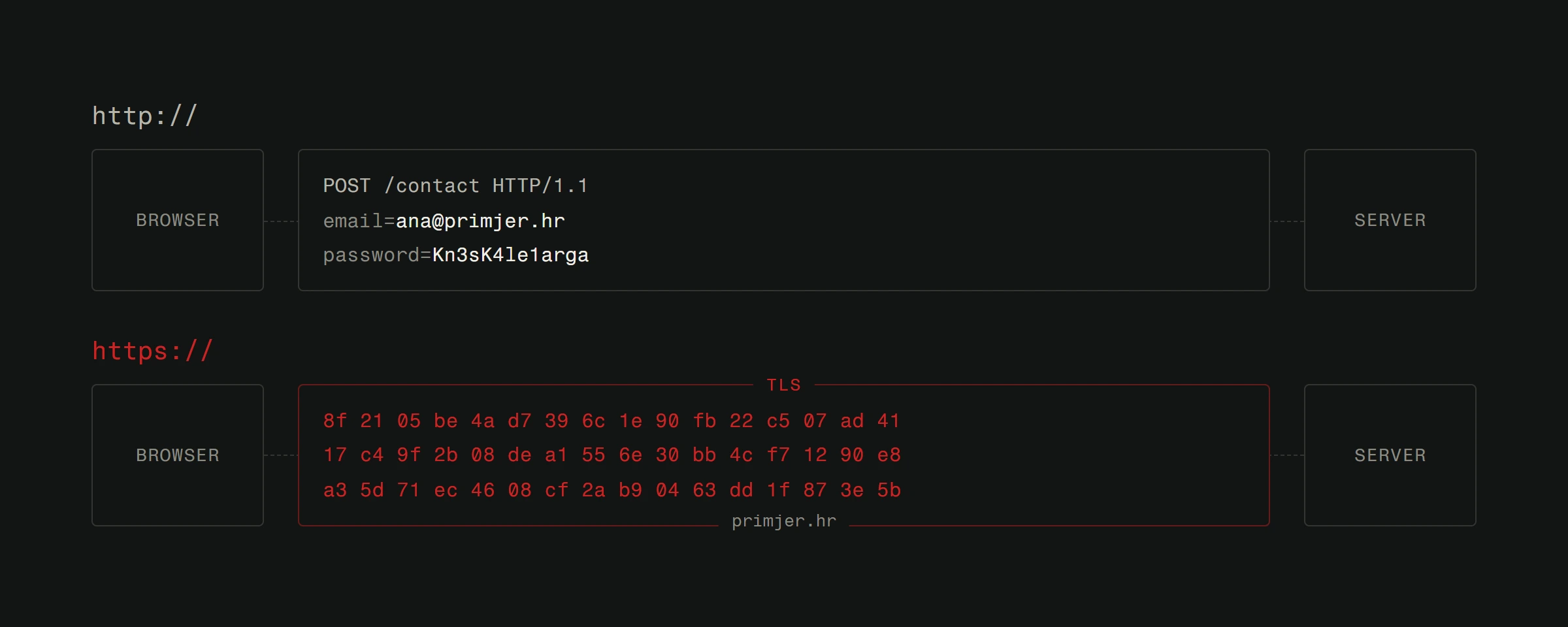
Beyond security, Google penalizes HTTP sites in search rankings. Browsers show a "Not Secure" warning. Visitors leave. There's zero reason not to have HTTPS. Most hosting providers offer free SSL certificates through Let's Encrypt.
Check your address bar right now. If you see a padlock, good. If you don't, that's your first task.
Keep everything updated
This sounds boring. It is boring. It's also the single most effective thing you can do.
When WordPress releases a security patch, the changelog tells the entire world exactly what vulnerability existed. Attackers reverse-engineer the fix to build exploits. Within hours, bots start scanning for sites that haven't updated yet.
The same goes for plugins, themes, server software, PHP versions, and every other piece of your stack. Each outdated component is a door you forgot to lock.
Set up automatic updates where possible. For critical plugins, check weekly. If you're running a plugin that hasn't been updated in over a year, find a replacement. Dead plugins are ticking time bombs.
Your website's speed also benefits from keeping things updated. Newer versions are almost always faster.
Use a web application firewall
A Web Application Firewall (WAF) sits between your server and the internet. It filters incoming traffic, blocking known attack patterns before they reach your site.
Cloudflare's free tier is a solid starting point. It handles basic DDoS protection, blocks known malicious IPs, and adds useful security headers. For higher-traffic sites, a paid WAF like Sucuri or Cloudflare Pro adds deeper inspection.
A WAF won't stop everything. But it catches the automated garbage that makes up 90% of attacks. Think of it as a bouncer at the door. Not perfect, but way better than no bouncer.
Passwords and authentication
Here's a stat that should scare you: "123456" is still one of the most common passwords in the world. If anyone with access to your site uses a weak password, your security is only as strong as that weakest link.
Enforce strong passwords. Minimum 16 characters. Mix of letters, numbers, symbols. Better yet, use a password manager and generate random ones.
Enable two-factor authentication (2FA). Even if someone cracks a password, they still need the second factor. Use an authenticator app, not SMS. SIM swapping is real.
Limit login attempts. After 5 failed tries, lock the account for 15 minutes. This kills brute force attacks dead.
Change default usernames. If your admin account is called "admin," rename it. Attackers try that first.
Backups: Your safety net
Backups don't prevent attacks. They prevent disasters.
If your site gets compromised, a clean backup means you can restore everything in minutes instead of rebuilding from scratch. Without backups, a successful attack could mean weeks of lost work.
Here's what a good backup strategy looks like:
- Daily automated backups of both files and database.
- Off-site storage. Your backups should not live on the same server as your site. If the server gets compromised, your backups go with it.
- Test your restores. A backup you've never tested is a backup that might not work. Try restoring to a staging environment quarterly.
- Keep multiple versions. Sometimes you discover a compromise weeks after it happened. Having 30 days of backups means you can go back far enough.
Security headers matter
Most developers skip security headers entirely. That's a mistake. These HTTP headers tell browsers how to handle your content and can prevent entire categories of attacks.
Content-Security-Policy (CSP) controls which scripts and resources can load on your pages. A strict CSP makes XSS attacks nearly impossible.
X-Frame-Options prevents your site from being embedded in iframes on other domains. This blocks clickjacking attacks.
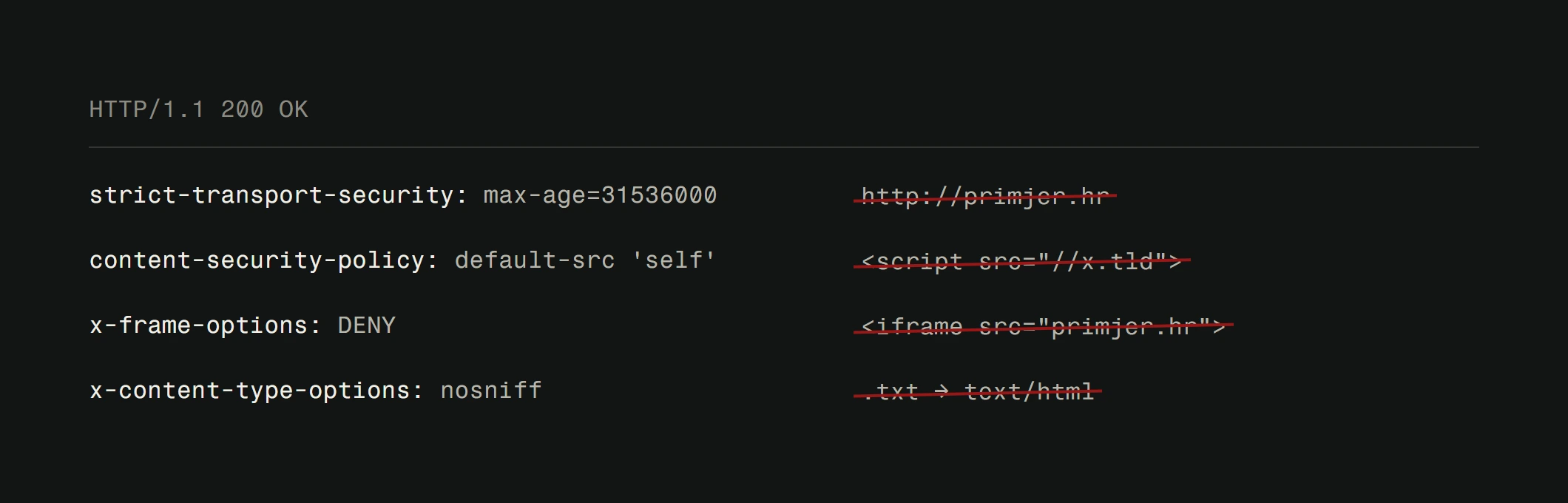
Strict-Transport-Security (HSTS) forces HTTPS connections and prevents protocol downgrade attacks.
X-Content-Type-Options stops browsers from MIME-type sniffing, which can turn innocent files into executable scripts.
Adding these headers takes 10 minutes. The protection they provide is massive.
Monitor and respond
Security isn't a one-time setup. It's an ongoing process. You need to know when something goes wrong.
Set up monitoring that alerts you to suspicious activity. Failed login attempts. File changes. New admin accounts. Unexpected traffic spikes. The faster you detect a problem, the less damage it causes.
Review your server logs periodically. Look for patterns. A flood of 404 errors to paths like /wp-admin or /.env tells you someone is probing your site. That's normal background noise, but unusual patterns deserve investigation.
For a deeper dive into protecting your site from targeted attacks, check out our professional security tips.
The human factor
The fanciest security setup in the world won't help if someone on your team clicks a phishing link and hands over their credentials.
Train everyone who has access to your site. Teach them to recognize phishing emails. Make sure they understand why strong passwords matter. Create a process for revoking access when someone leaves the team.
Security is a user experience concern too. If your security measures make the site unusable, people will find workarounds that create new vulnerabilities. Security is also central to making your website more trustworthy in the eyes of visitors: a "Not Secure" warning in the browser bar can undo months of brand-building work.
Where does your site stand?
Run the free check: we read what your site shows publicly, with no passwords and no access. If you want someone to watch and patch it regularly, see the protection plans.
Website security doesn't have to be overwhelming. Start with the basics: HTTPS, updates, strong passwords, backups. Then layer on a WAF, security headers, and monitoring. If you'd rather have someone handle this properly from the start, we build sites with security baked in from day one.