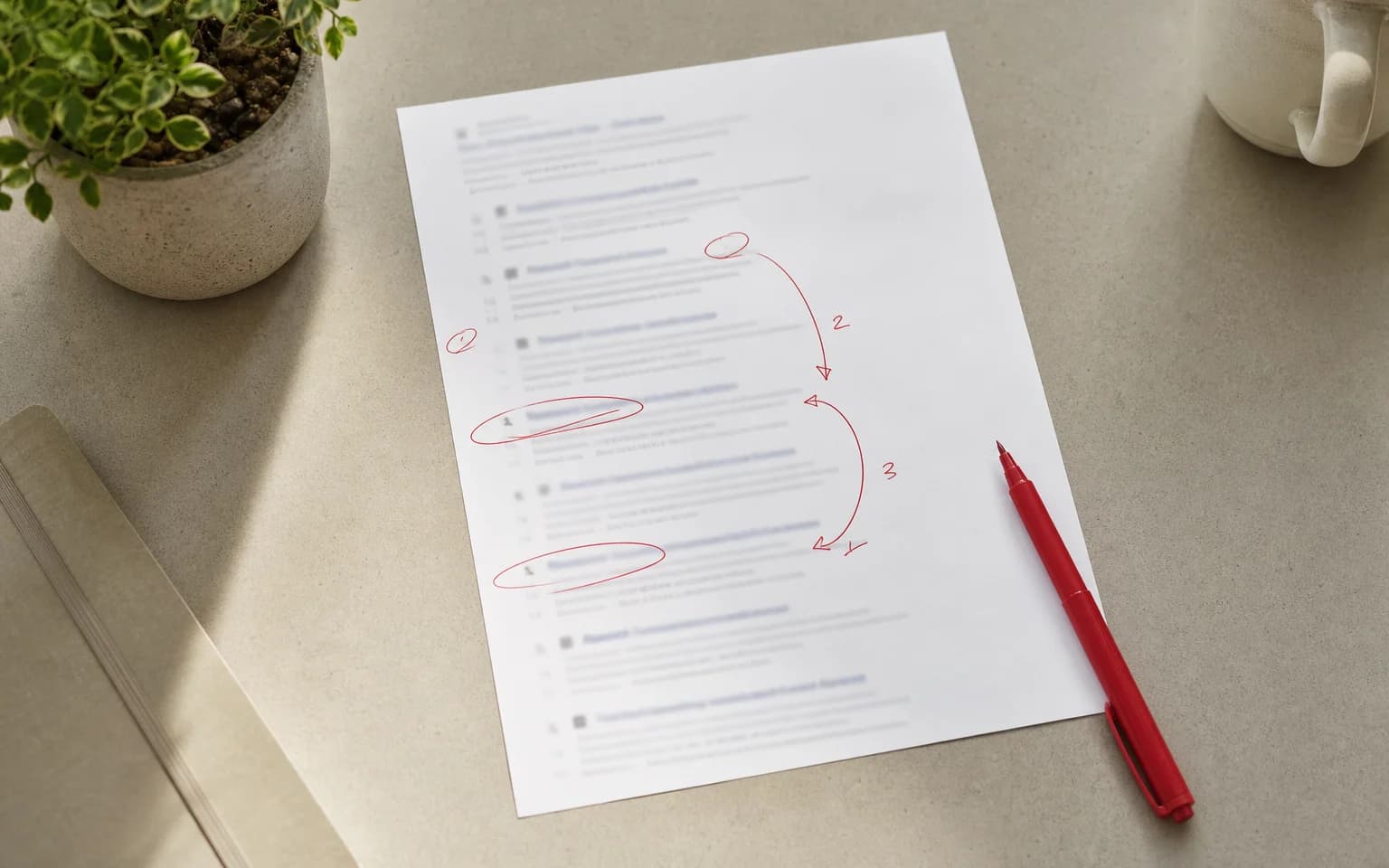
You could write the smartest post in your field. If Google can't find it, nobody will read it. SEO for your blog fills that gap.
SEO isn't a trick. It's a set of practices that help search engines understand what your content is about and who to show it to. Done well, a blog becomes a steady source of visits and enquiries. Without it, you're writing into the void.
Here's how to write posts that both people and search engines like, including what changed now that Google also answers with AI summaries.
Start with keyword research (not a blank page)
Most people start writing with a topic in mind. That's the wrong order. Start with what people actually search for.
Keyword research shows you the exact phrases your audience types into Google. It decides not only what you write about, but how you frame it.
How to find the right keywords
Use Google Keyword Planner (free), Ubersuggest (has a free version) or Ahrefs and Semrush (paid, with more data). If your site already gets visits, the best source is Search Console: it shows the queries you already appear for. Look at:
- Search volume. How many people search this term each month? Too low and nobody's looking. Too high and the competition is heavy.
- Competition. How hard will it be to rank? New blogs do better with low to medium competition terms.
- Search intent. Is the person looking for information, a product or a specific site? Your content has to match the intent.
Pick one main keyword per post and two or three related ones that fit naturally. Longer, more specific phrases (long-tail keywords) are often the best opportunity for newer sites because they have less competition and a clearer intent.
Where to place keywords
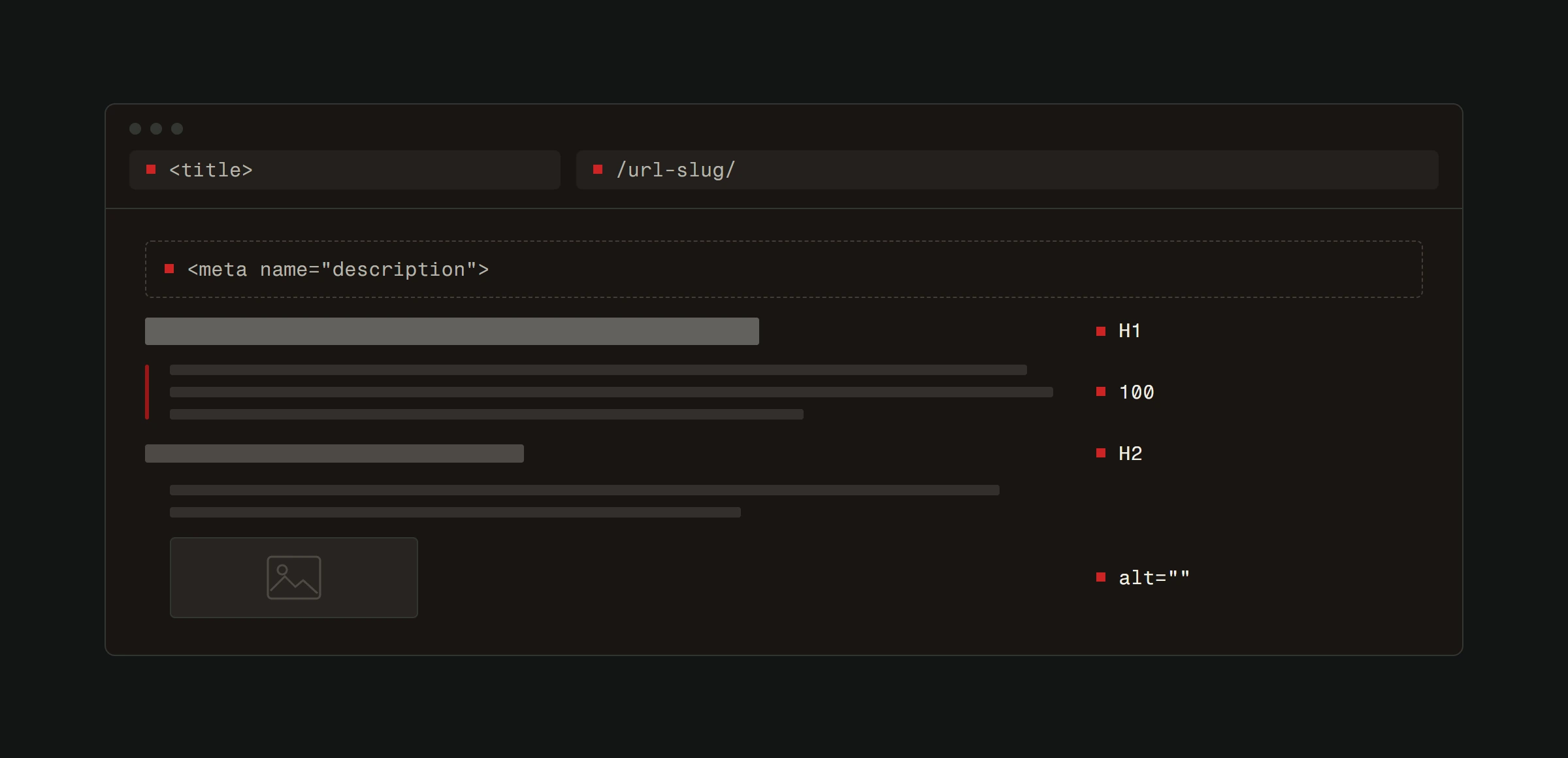
- Title (H1). Your main keyword goes here, ideally near the start.
- Opening paragraph. Say straight away what the post is about, so both the reader and Google know what to expect within the first few sentences.
- At least one H2 heading. It shows what the section is about.
- Meta description. The text Google may show under your title in the results. Include the keyword and write it so people want to click.
- URL. Keep it short and include the main keyword.
- Image alt text. Describe what the image shows, and include the keyword only where it's natural.
The emphasis is on "natural". If you push keywords into every sentence, Google recognises it, and your readers certainly do. Write for people first and put keywords where they fit on their own.
Structure posts for readability and indexing
Both Google and readers find their way around well-organised content more easily. People leave a wall of text without structure quickly.
Use a heading hierarchy
H1 is your title and is used once. H2 marks your main sections, and H3 splits them into smaller parts. This hierarchy shows what your article covers and how it's organised.
Don't skip levels. Don't put an H3 before an H2. Don't use headings just to make text bigger.
Short paragraphs, short sentences
Two to three sentences per paragraph. This isn't academic writing. People skim online, so make it easy for them.
When you cover several items, use bullet points and numbered lists. They break up the monotony and make key information easier to find.
Internal links
Every post should link to two to four other pages on your site. That does two things:
- Google uses links to find new pages and to understand what they're about.
- A reader who wants to know more has somewhere to go next instead of returning to the search engine.
Link naturally. If you mention site speed, link to your speed optimization guide. If you mention backlinks, link to your backlinks article. Make the link text describe the destination, not "click here".
Write content that deserves to rank
Google judges content quality very well. You can get every technical SEO detail right and still not rank if the content doesn't help.
Depth beats breadth
Google says explicitly that it has no preferred word count. Length on its own doesn't help. What matters is covering the topic well enough that the reader doesn't need to search again: answer related questions, give concrete examples and explain why something works.
Some topics fit in 600 words, others need 2,000. Ask whether the reader got everything they need from your post, not whether you hit a number.
Be specific
Vague advice is everywhere. "Create quality content." "Focus on your audience." "Be consistent." The reader already knows that.
Specific advice earns trust and links. Instead of "optimize your images", say "compress images below 200 KB as WebP, add descriptive alt text and use the srcset attribute". Specificity separates content that ranks from content that fills space.
Show original thinking
Google describes the content it wants to show in terms of experience, expertise, authoritativeness and trustworthiness (E-E-A-T). According to its documentation, E-E-A-T isn't a specific ranking factor, but its systems use a mix of signals that identify such content, and trust matters most. Restating what the top ten results already say won't get you into the top ten.
Add your own view. Share examples from your work and data you measured yourself. Google recommends making it clear who wrote the content, how it was made and why it exists. The helpful content system that rewarded this became part of Google's core ranking systems in March 2024, so it counts on every post.
Writing with AI
AI can help with a draft, a structure or a translation, and Google doesn't forbid it. Its spam policies forbid something else: creating pages at scale with the main purpose of manipulating rankings, no matter how they were made. Google gives the example of using generative AI to create many pages that add no value for users.
If you rely on AI heavily, Google advises making that clear to the reader. Check every fact, add what only your business knows, and publish less but better.
Optimize your images
Images make posts more engaging and tell Google more about your content. But unoptimized images are one of the most common reasons a site is slow.
File size
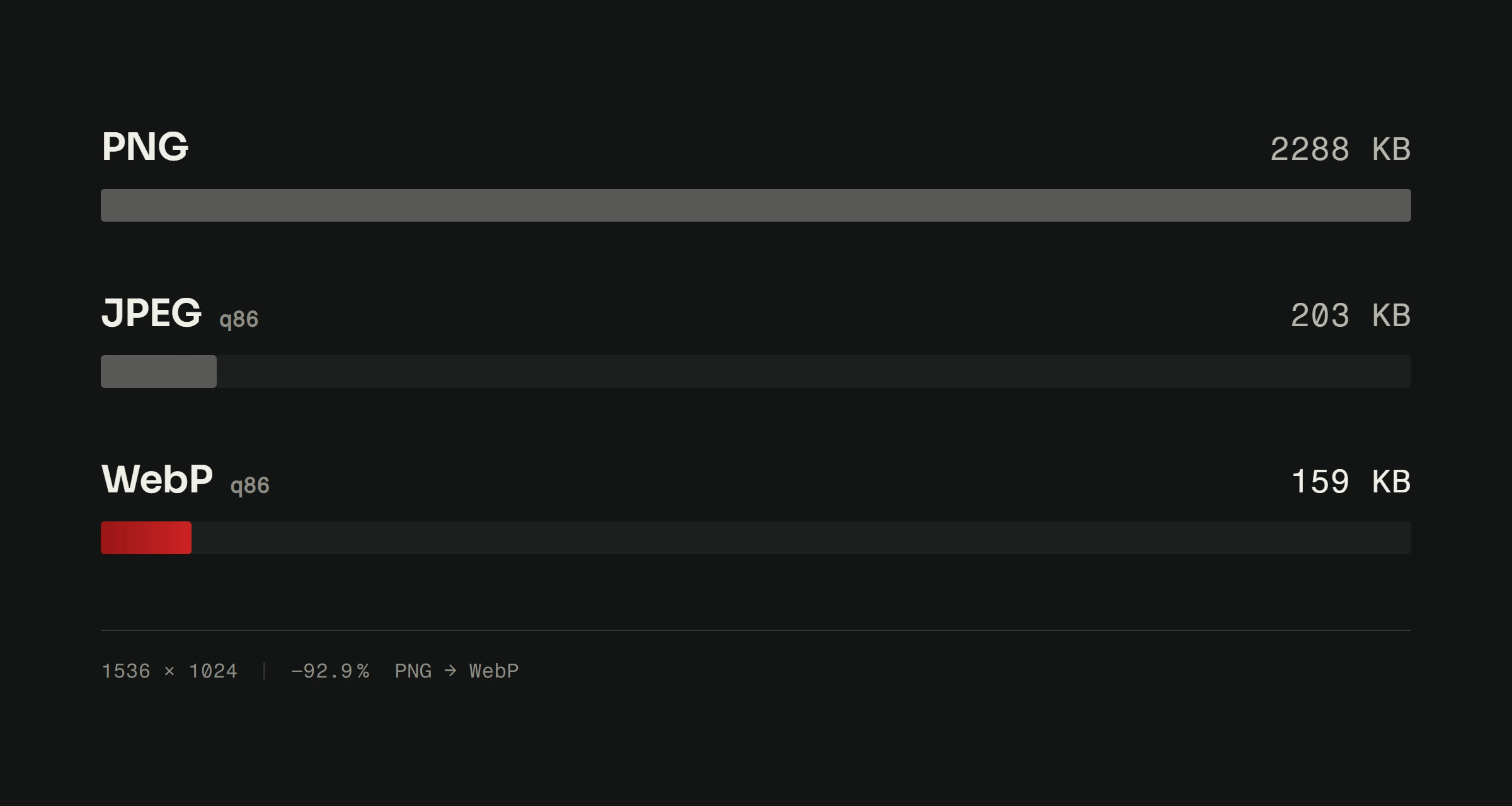
Compress every image before uploading. WebP gives a good balance of quality and size. A hero image should be under 200 KB. Photos of 2 MB straight from the camera noticeably slow your page down.
Alt text
Alt text serves two purposes: accessibility (screen readers use it to describe images to blind and low-vision people) and SEO (Google reads it to understand what the image shows).
Write descriptive, honest alt text. "Screenshot of Google Search Console showing query data" is good. "SEO keyword ranking Google best tips" is keyword stuffing and helps nobody.
File names
Rename images before uploading. "website-speed-test-results.webp" tells Google something useful. "IMG_20230714_143822.jpg" tells it nothing.
Technical details that affect blog SEO
Page speed
Google recommends good Core Web Vitals and says a good page experience aligns with what its ranking systems reward. Relevant content still comes first, and speed helps when the competition is equally good. For blog posts specifically:
- Compress images (the biggest cause of slow blogs).
- Reduce external scripts (tracking, widgets, social embeds).
- Use lazy loading for images below the fold.
- Choose hosting that serves pages quickly.
Test on PageSpeed Insights and fix what it flags. How much speed really affects your position is explained in our article on Core Web Vitals.
Mobile experience
Google indexes the mobile version of your site. If your blog looks bad on a phone, it shows in your rankings on every device.
Check that text wraps properly, images resize, buttons and links are big enough to tap and nothing spills off the screen. Our responsive design article covers this in detail.
Meta descriptions
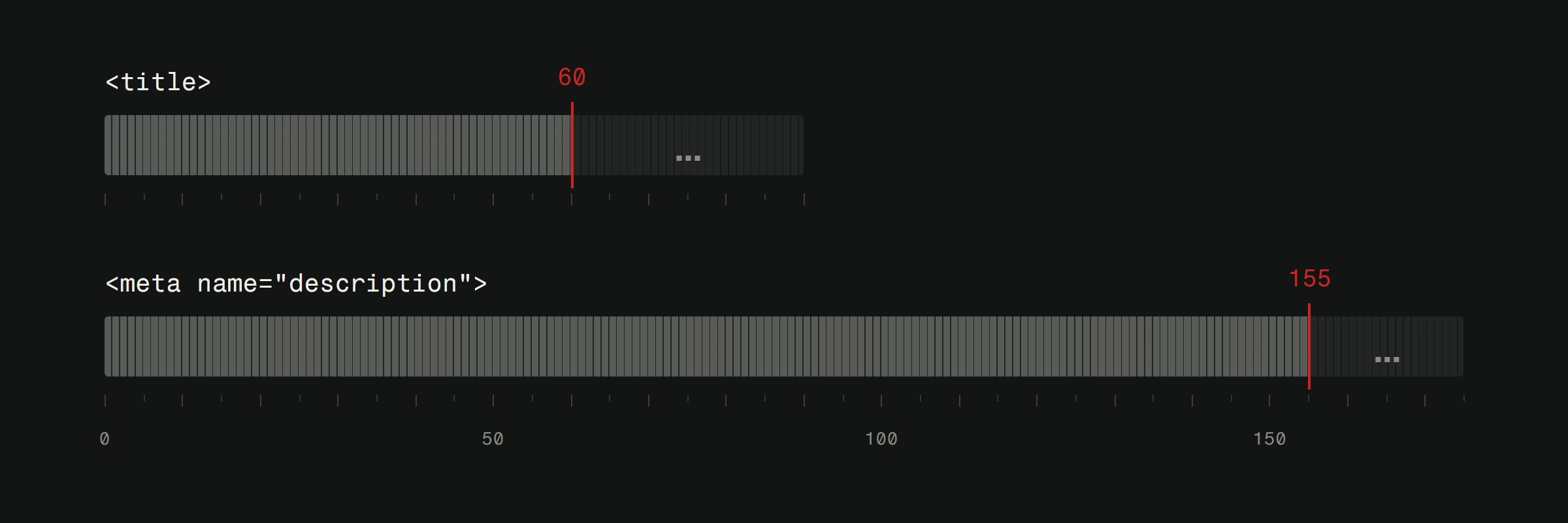
Every post needs its own meta description. Google may show it under your title in the results, but it usually builds the snippet from the page content and uses the meta description when it describes the page better. Google sets no length limit; it truncates the snippet to fit the screen width, so around 155 characters usually fits whole. Include your main keyword and write a summary that convinces someone to click.
A good meta description won't lift your position directly, but it can bring more clicks from the same position.
After publishing: promotion and tracking
Writing the post is half the job. The other half is making sure people find it.
Promote your posts
Share it on social media, send it to your email list and mention it in relevant communities. Your first readers come from there, and a good post that people see has a chance to earn links.
Track performance
In Google Search Console, track which queries your post appears for, how many impressions and clicks it gets and where it ranks. Search Console counts visits from AI Overviews and AI Mode in the same report, under the Web search type. Give a new post a few weeks to settle before you change it.
If a post still brings no visits after a month, review it. Is the keyword too hard? Is the content thinner than what ranks above you? Does it match the search intent? Find the cause and improve the post instead of abandoning it.
Update regularly
Published content isn't finished content. Review your best posts every 6 to 12 months. Refresh the numbers, add new information and remove outdated advice. For queries where people expect fresh information, Google has systems that give newer content priority, and an updated post keeps the links and history it has already built.
For a broader view of why consistent blogging matters for your website, check our dedicated guide.
The compound effect of blogging for SEO
Blogging for SEO isn't a quick win. One post rarely changes everything. But every well-written post adds another page that can rank for new queries and another way in for potential customers.
Over time it adds up. The more of your posts usefully answer questions in your field, the more queries can bring people to your site, and new posts can build on the links and readers the older ones have gathered.
The blogs that bring visits usually aren't the ones with the most posts, but the ones that publish useful posts for years and keep the old ones current.
Need help building an SEO content strategy? Check out our SEO services or request a free website analysis to see where your blog stands today.